Internet

241 posts

Twitter for iOS and Android updated

Twitter have released updates to their iPhone and Android apps. Tweeting is now even easier and more seamless.

Twitter for iOS and Android updated
Photos: When you add a photo to your Tweet, you’ll see a full preview of your photo, not just the cropped version. We’ve also redesigned the experience to make it easy to share a photo from your camera roll: simply click the photo icon on the bottom right corner of the Tweet box. With fewer steps needed to share photos, you can more easily share what’s going on in your life and quickly return to marveling over that gorgeous sunset.

Accounts: When you compose a Tweet, you’ll see your avatar and username, giving you a better sense of how your Tweet will actually appear. If you tweet from multiple accounts, it’s now easier to select the account you want to use by simply tapping on your avatar.

Location: You can still add or remove your location from individual Tweets right from the Tweet box. Tagging your location is a handy way to save characters and provide context.

Read more: https://blog.twitter.com/2013/new-iphone-android-features-better-tweeting-0

Google Calendar for Android adds color highlighting, date and time picker tweaks

Google Calendar for Android gets color highlighting, date and time picker tweaks.

colordatetime
“One of the most requested features we’ve seen so far for Google Calendar on Android is the ability to customize event and calendar colors directly from your device. Today’s update allows you to do just that (Android 4.1 or higher for custom event colors). Now you can highlight those super-urgent meetings and important birthdays, or just switch up the color of your calendar whenever your heart desires

Adding events is now easier and more fun with our redesigned date and time pickers, which let you schedule your special dinner date or the start of your well-deserved vacation in a snap.”

Read more: http://officialandroid.blogspot.co.uk/2013/05/google-calendar-update-for-android.html

Google updates Gmail with tabbed inbox

Google has updated Gmail with tabbed inbox on on desktop and mobile versions.

On the desktop, the new inbox groups your mail into categories which appear as different tabs. You simply choose which categories you want and voilà! Your inbox is organized in a way that lets you see what’s new at a glance and decide which emails you want to read when.

You can easily customize the new inbox – select the tabs you want from all five to none, drag-and-drop to move messages between tabs, set certain senders to always appear in a particular tab and star messages so that they also appear in the Primary tab.

In the Gmail for Android 4.0+ and Gmail for iPhone and iPad apps, you’ll see your Primary mail when you open the app and you can easily navigate to the other tabs.

The new inbox is rolling out gradually. The desktop, Android and iOS versions will become available within the next few weeks. http://gmailblog.blogspot.ca/2013/05/a-new-inbox-that-puts-you-back-in.html

Google combines Drive Gmail and Google+ Photo storage into 15GB

Google has announced instead of having 10 GB for Gmail and another 5 GB for Drive and Google+ Photos, you’ll now get 15 GB of unified storage for free to use as you like between Drive, Gmail, and Google+ Photos.

“With this new combined storage space, you won’t have to worry about how much you’re storing and where. For example, maybe you’re a heavy Gmail user but light on photos, or perhaps you were bumping up against your Drive storage limit but were only using 2 GB in Gmail. Now it doesn’t matter, because you can use your storage the way you want.”

More info: http://googledrive.blogspot.co.uk/2013/05/bringing-it-all-together-15-gb-now.html

Google Earth 7.1 for Android introduces Street View

Google Earth 7.1 for Android has been announced. This new mobile version of Earth includes great new features like the addition of Street View, better search and directions and a streamlined interface.

Google Earth 7.1
Google Earth’s 3D imagery has always been a great way to immerse yourself in the world. With the addition of Street View to Earth for Android, you can now check out the world from the street level too. Simply zoom into an area you’d like to explore and Pegman will appear in the right hand corner. Drag and drop the Pegman into the street and you’ll be greeted by familiar Street View interface. More info: https://plus.google.com/u/0/+GoogleEarth/posts/UJypmc8TdSe

Adding events to Google Calendar from Gmail

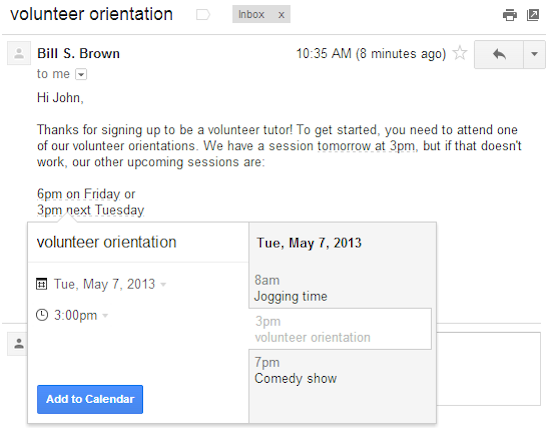
You can now add events to Google Calendar from Gmail writes Boris Khvostichenko, Product Manager on the Gmail blog.

Google Calendar from Gmail
“If you do a lot of scheduling over email, it’s now a little bit easier to create events directly from your Gmail. Starting today, dates and times within emails are lightly underlined: click them to schedule that conference call or lunch date without ever leaving Gmail.

When you click on one of these underlined dates, you’ll be able to preview your schedule for the day and change the title, date or time of the event. Clicking “Add to Calendar” will do exactly that — add the event to your calendar, and for extra convenience, the calendar event will include a link back to the original email.

This new feature is rolling out over the next week to everyone with the English (US) language. We’ll be adding other languages soon”

Twitter updates iOS and Android apps

twitter mobile app
Twitter has updated it’s iOS and Android apps. Both versions gain a clearer look at trends and local Tweets, faster account changing, and bug fixes. In addition to these, the iOS version of Twitter gains the ability to invite friends to Twitter from within the app, improved playback of Vine videos, and more complete conversations that include retweets.

Google Places for Business app

Google have announced it’s Places for Business app. Google Places for Business gives you access to free tools that help your business get online, be found on Google Search and Maps and get closer to your customers. There is also a premium version.

Google Places for Business app

Business owners can use the app to:
– Verify your business listing directly from your phone
– Update your business information: hours, address, contact information, and description
– Post beautiful pictures of your business on your local Google+ page
– Track web traffic going to your listing
– Manage multiple business locations from one app

More info: http://www.google.com/placesforbusiness

UK gets Google Map Maker editing tool

Google is expanding its Map Maker edit tools to the UK.

The browser-based software allows users to add details about buildings, hiking trails, vegetation and other features to its maps of the country.

Suggested additions and amendments are reviewed by other users and the firm’s own staff before going live.

Evernote 5 for Android

Evernote has updated its Android client to version five with New Camera, Evernote Smart Notebook Support, Document Search, Shortcuts, and More.

Evernote 5 for Android

“It looks more beautiful than ever, comes with a great Premium feature, adds a whole new camera with support for our Evernote Smart Notebook, plus a whole lot more.”

More info at: http://blog.evernote.com/blog/2013/03/25/evernote-5-for-android-new-camera-evernote-smart-notebook-support-document-search-shortcuts-and-more-2/

Google Keep note taking service

Google have launched Keep a note taking service that uses Google Drive.

“Every day we all see, hear or think of things we need to remember. Usually we grab a pad of sticky-notes, scribble a reminder and put it on the desk, the fridge or the relevant page of a magazine. Unfortunately, if you’re like me you probably often discover that the desk, fridge or magazine wasn’t such a clever place to leave the note after all…it’s rarely where you need it when you need it.” Read more at: http://googledrive.blogspot.co.uk/2013/03/google-keepsave-whats-on-your-mind.html

Dropbox redesigned desktop client

Dropbox has redesigned it’s desktop client with a new Dropbox menu.

“Life (in Dropbox) moves pretty fast. If you don’t stop and look around once in a while, you could miss it. And with all the stuff you’ve got goin’ on, we figured it’d be handy for you to keep track of all your exploits in one place: the Dropbox menu!”

Dropbox redesigned desktop client

“We’ve made it easier than ever to accept invitations to shared folders, see links or albums that people have shared with you, and keep tabs on what’s changed in your Dropbox.

If someone shares a link with you, you can now get to it immediately — directly from the Dropbox menu! You’ll get notifications in real time as people share with you, and can see them later just by clicking the Dropbox icon. You can also accept or decline invitations to shared folders directly from your desktop.”

Download the latest version of Dropbox at: https://www.dropbox.com/install