Technology

330 posts

Box for Android updated to 1.5

In version 1.5 of Box for Android, we’ve added 3 main features that will help those actively sharing and editing files on Box with others. You can now keep an eye on updates to your files right from a home screen widget, send files to Box from anywhere you can open files (like email attachments), and create new Office® documents with compatible apps like QuickOffice Pro.

When you’re working with a lot of people on a number of files simultaneously, it’s hard to keep track of what version of which file is updated, and when. When accessing Box in your browser or on your iPhone or iPad, you see these details in an Updates feed. Now Box for Android goes one step further and puts updates right on your home screen with the Box widget!

To add the widget, just long-press on an empty space on a home screen, choose to add a Widget, then choose “Box”. Position the widget wherever you’d like by long-pressing on it and dragging it around.

In addition to showing updates, the widget also provides useful shortcuts to create or upload new files without needing to open the Box app.

Upload files from any app

Wherever you have the option to view a file, you now also have the option to upload it to Box – which is really useful when you get email attachments or download files via the browser. Put them on Box and start sending links instead of attaching files in emails!

Create Office documents

If you have an app capable of editing these file types, you will see new options to add documents, spreadsheets, presentations and plain text files on the Create menu. Choosing these file types will open the editor of your choice and save the file you create back to Box when you’re done.

You’ll need an app capable of editing these files (not just viewing them) in order to see this feature – we recommend QuickOffice Pro, DocumentsToGo or Kingsoft Office.

Skype and Tely Labs Partner to Bring Android HD Video Calling to the Living Room TV

Advanced, All-in-One, Android-Based System Lets Consumers Connect Instantly to Those Who Matter Most — Right From Their TV, in Amazing HD Video Quality
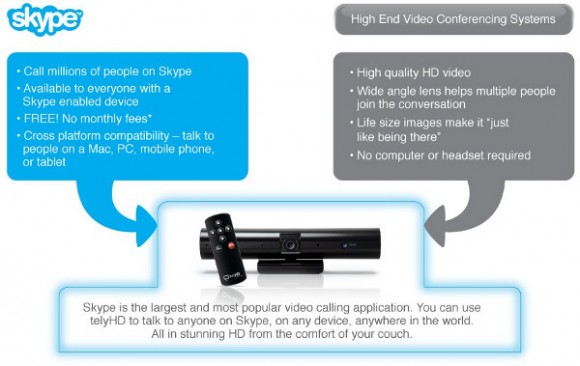
Skype and Tely Labs today announce a partnership in which Tely Labs will offer Skype’s globally popular communications software in their powerful, yet compact, video calling device — telyHD, allowing everyday consumers to experience free Skype video calling with big-screen impact and high-definition clarity. Now, the entire household can use their TV to instantly and easily connect face-to-face with family and friends worldwide through Skype — whether on a computer, tablet, smartphone or TV. telyHD — which doesn’t require a computer and is compatible with most HD TVs — is well-priced, sets up in minutes, uses industry-leading Skype and Android technologies, and allows for video calls to take place in a comfortable, naturally social setting — your living room.

“telyHD fundamentally redefines the video calling experience and, in a larger sense, how we connect and communicate with people across the globe. We acknowledge the potential of video calling and the power of Skype as we evolve it beyond the computer screen and onto an HD TV that closely resembles immersive, real-world interaction. What’s truly exciting is that we make this next-gen video interaction possible with telyHD, an extremely simple-to-use device designed and priced for everyday consumers,” said Sreekanth Ravi, CEO of Tely Labs.

“We are proud of our work with Tely Labs, because it demonstrates how pioneering companies can integrate the Skype platform into our users’ daily lives in compelling new ways providing our community with the widest possible range of video calling options. We are excited that, with telyHD, our users will have an entirely new way to enjoy HD big-screen interaction with their friends and family,” said Manrique Brenes, Skype’s senior director of platform business.

Skype in HD Moves into the Living Room
telyHD gives consumers the freedom to share moments big and small with friends and family around the world. Unlike traditional computer-based web cameras, telyHD is designed for the living room with a wide-angle camera that zooms, pans and tilts to capture an entire room and all the participants in stunning HD video.1 By opening up the living room to Skype, consumers can interact in a more natural, social way. Anyone on Skype can receive a telyHD video call, whether using Skype on a computer, tablet or smartphone, and can enjoy the improved telyHD video regardless of whether or not they have their own telyHD system.

When both parties have telyHD systems, they can take advantage of even more capabilities including video mail — a messaging system feature that allows users to record a video message such as a birthday greeting for friends or family that are not available to chat. Additionally, participants can share photos together while interacting on a telyHD video call. Users can even download a favorite photo right to a USB memory stick or SD card that plugs into the telyHD system as they video chat.*

Simple, Affordable, and Complete System
An all-in-one system, telyHD includes everything necessary to initiate a video call in minutes. The single-box solution features a wide-angle HD camera, four microphones with noise cancellation, built-in Wi-Fi or wired Internet connectivity, an easy to use remote control, and all necessary cables. telyHD does not require a computer or any additional hardware; users simply link it to their home network and plug it into their HD TV via HDMI. The telyHD unit sits discreetly on top of the TV or can be placed on a nearby shelf or tripod. It has a fully adjustable clamp so that it will fit perfectly on any size TV.

Extensible Android-Based Entertainment Platform for the Future
When a consumer purchases telyHD today, they benefit from the immediate Skype video calling capabilities and also buy into a system that is designed for the future. The telyHD system is built on the powerful, extensible Android OS and uses the high-performance Tegra 2 Dual-Core ARM A9 processor from NVIDIA. With this solid foundation, telyHD users will be able to use the system for an array of compelling home entertainment activities in the future — from social networking and gaming to video streaming and more. Tely Labs is already working with the Android developer community to identify new apps that extend the ways consumers can use and enjoy telyHD in the home.

Pricing and Availability
telyHD will be available beginning January 5, 2012 through online retailers Amazon, Tely.com and Skype.com. The telyHD system is priced at $249 with no monthly fees and no PC required**.

About Tely Labs:
Founded in 2010 by the successful entrepreneurial team Sreekanth Ravi (president and CEO) and Sudhakar Ravi (CTO), Tely Labs is a pioneer in developing simple, affordable next-generation entertainment and communications systems that fundamentally change the way consumers communicate across the globe. The company’s flagship product, telyHD, will be publicly unveiled at CES 2012 in Las Vegas. Built on the fast-growing Android OS and Skype software, telyHD delivers full HD Skype video calling to the living room on an HD TV allowing everyday consumers to experience free Skype video calling with big-screen impact and high-definition clarity. Tely Labs is based in Menlo Park, California.
Visit us on the web at www.tely.com/.

About Skype
Skype is a communications software whose purpose is to break down barriers to communication. With an Internet-connected device, families, friends and colleagues can get together for free with messaging, voice and video. At low cost, they can also call landlines or mobiles virtually anywhere in the world. Skype has recently introduced group video, allowing groups of more than two people to do things together whenever they’re apart.

Founded in 2003 and based in Luxembourg. Skype can be downloaded onto computers, mobile phones and other connected devices for free at www.skype.com.

1 HD quality is achieved with HDMI enabled TVs
*telyHD to telyHD only
**broadband/Wi-Fi connection is required

Red Scarlet-X 4K camera video review

Cinema5D have posted some video review for Red’s Scarlet-X 4K camera at www.cinema5d.com/news/?p=9409

With the innate ability to capture 5K REDCODE RAW stills and 4K motion, resolution sustains itself as a dominant gene in the RED family. Scarlet-X functions as a flexible device, utilizing HDRx and interchangeable lens mounts to provide you with options in a world that’s always changing. 5K burst modes snap up to 12 fps with 4K reaching up to 30 fps—helping you capture every perfect moment. All of the finest qualities of cinema and photography have now aligned, letting you take advantage of the best of both worlds with Scarlet-X.

Samsung DV300F Wi-Fi Digital Camera

Samsung Electronics Co., Ltd, unveiled a new addition to its market-leading Samsung DualView® line, the DV300F. With this launch, Samsung continues to cement its leadership position by introducing the latest in Dual LCD technology with Wi-Fi connectivity for camera users who want to snap and share moments in an instant.

The Samsung DV300F builds on the success of Samsung’s DualView technology with a 1.5″ front facing LCD screen that helps ensure users are capturing the most challenging shots. Child Mode displays an animation to keep little ones focused, and the visual Self Timer makes it easy to put oneself in the picture.

In response to evolving consumer demands for maximum creativity and shareability, the DV300F is the first DualView model to offer Wi-Fi connectivity. The camera’s built-in Wi-Fi connectivity enables users to email their images or upload them to social media sites including Facebook, Picasa, Flickr and YouTube. In addition, images saved onto the camera’s microSD memory card, can be saved to a home PC without wires, by using the Auto PC Backup function. Cloud services, including Samsung’s AllShare Play and Microsoft SkyDrive, allows users to store and share their precious pictures from anywhere.

For consumers on the lookout for sophisticated design and premium quality, the latest model comes in several shimmering metallic colors, including mock black, silver, navy and red. The new DualView camera features a sleek, seamless, and rounded form factor for ultimate style without compromising ease of use and image quality. The DV300F boasts an impressive 16 Megapixels, 5x optical zoom and 25mm wide-angle lens to capture all the action, even from a distance.

“Our aim is to continually be at the forefront of innovation and maintain our leadership within the DualView market, pioneered by Samsung,” stated Mr. Myoung Sup Han, senior vice president and head of digital imaging business, Samsung Electronics. “The new DV300F model is the embodiment of this goal. This latest model with the DualView LCD, Wi-Fi connectivity, ultra premium styling and the latest creative features, demonstrates Samsung’s unwavering commitment to innovation within the digital compact camera market, as well as our ability to consistently meet the needs of our customers.”

Get Creative with Magic Frame and Picture-in-Picture Shot
The DV300F is crammed full of fun features to maximize users’ enjoyment. The Magic Frame feature includes 12 fun background templates, as well as the ability to create poster-quality art, perfect for sharing or hanging. The camera’s Picture-in-Picture function lets users insert one image within another. Users can even impress their friends by combining a still picture with a video clip and instantly uploading it to YouTube or other social networking sites.

Maximize enjoyment with latest Photo shot features
With the Split Shot feature, users can merge up to three different images to create their very own artistic masterpiece! Pictures can even be imported from other cameras. However, the fun doesn’t stop there. Funny Face allows photographers to add goofy grins, comical noses or even crazy eyes to shots of friends and family in eight different modes.

The innovative new Artistic Brush feature can instantly take a portrait, landscape shot or even a movie clip and transform it into a black and white or full color sketch just like an artist would! Users can then show off their artistic creation via the camera’s LCD, or by simply uploading their creation to social networking sites to ensure everyone look at their creative masterpiece or potentially, their latest profile picture — with a twist.

Finally, the model includes the new Motion Photo feature. Similar to the latest Hollywood blockbuster, users can freeze time around a moving subject for dramatic effect. Now, users can capture a friend jumping in the park and keep everyone else around them still.

Google to Launch iPad Competitor

Eric Schmidt, Google’s acting chairman confirmed that his company is currently planning to launch its own tablet device in no later than the next 6 months.

“In the next six months we plan to market a tablet of the highest quality,” Schmidt reportedly said during an interview with an Italian newspaper, Corriere Della Sera.

Firefox 9 for Android With Tablet Support

Firefox have announced a completely new version of the popular web browser, Firefox for Android, just for tablets. Along with the new look you will also notice minor bug fixes here and there and as an added nice gesture, you should also see a faster start-up time for the app.

Firefox for Android leverages large tablet screen sizes and optimizes popular features for tablets. The Screen integrates Firefox Sync and makes it easy to access your browsing history, open tabs, bookmarks and saved passwords across desktop and mobile devices so you can type less and browse more.

New in this version:
New tablet UI and features
Faster start-up time
Camera input support: developers can integrate camera functionality directly in Web sites
HTML5 form validation

More info: http://blog.mozilla.com/blog/2011/12/20/new-firefox-for-android-experience-optimized-for-tablets/

Huawei Mercury Announced on Cricket

Long Anticipated Android™ Smartphone Features 4-inch Screen and 1.4GHz Processor

Cricket Communications, Inc., a leading provider of innovative and value-driven wireless services and a wholly-owned subsidiary of Leap Wireless International, Inc. (NASDAQ: LEAP) today announced the exclusive United States availability of the Huawei Mercury, Cricket’s fastest and most powerful smartphone, yet. This highly anticipated device is available now for $249.99 (MSRP) at Cricket branded retail stores, dealers and at www.mycricket.com.

“We are extremely pleased to be the first carrier in the United States to bring this high quality smartphone to customers and we’re excited that we are able to offer this compelling device at a very affordable price,” said Matt Stoiber, senior vice president, devices for Cricket. “In addition to its big screen and powerful processor, the Huawei Mercury is packed with many great features including a VGA front facing camera and 8MP rear camera and camcorder with LED flash. Users can also enrich their wireless experience by tethering the powerful Mercury to their tablet and other devices through Cricket’s new tethering service plan over Cricket’s high-speed 3G network.”

“Huawei’s device strategy has always been to ensure that carriers can continue to grow the population of smartphone connected consumers. We’ve been able to establish ourselves as a player in this market by providing affordable smartphones, and we’re building on that foundation with devices for the high-tier market now,” said Jiangao Cui, President of Huawei Device USA. “This particular device, the Huawei Mercury, is an opportunity for us to offer a quality high-end device to the U.S. market that can deliver rich multi-media content including music, video and gaming applications seamlessly.”

Huawei Mercury Features

1.4Ghz Processor
4″ FWVGA Touchscreen
Email application for both consumer and business email
8.0 MP AF HD rear camera/camcorder
VGA Front Camera
2GB Internal Memory
Real Web Browsing at 3G speeds
Wi-Fi Capable
Stereo Bluetooth
Mobile Hotspot (i.e. Tethering); supports up to 5 devices
Support for Google Mobile™ Services – Gmail™, Google Maps™ with 3D maps and free turn-by-turn navigation, Google Earth™, Movie Studio, YouTube, access to more than 300,000 apps, millions of eBooks, thousands of movies to rent from Android Market
The Huawei Mercury joins Cricket’s growing smartphone lineup and is available on Cricket’s $55 per month smartphone service plan that includes unlimited talk and long distance, caller ID, voicemail, call waiting, 3-way calling, call forwarding, unlimited text, picture and video messaging, 3G mobile data and email.
Additional Cricket Services Supported

Cricket Storefront Client — The Cricket Storefront is Cricket’s own application storefront which is preloaded from which users can purchase ringtones, graphics, ringback tones, games and applications. A user must have Flex Bucket funds available in order to make purchases from Cricket’s Storefront.

Cricket Mobile Web — Access the Internet from the phone, anywhere Cricket data coverage is available.

My Account — My Account provides Cricket customers with online access to billing and account information. Once customers are registered and logged into My Account they have the ability to add a line of service, upgrade their phone, change their plan, add new plan features, change billing and communication preferences, view text message purchases and check the status of an online order.

My Backup — The My Backup application will back up the users contact list, perform regular updates and download contacts.

For more information about Cricket’s dynamic device lineup, please visit www.mycricket.com. To follow Cricket’s latest news and updates online, go to Facebook at www.facebook.com/cricketwireless and Twitter at http://www.twitter.com/cricketnation.

PocketCloud Explore Announced for Android

PocketCloud Explore Debuts as First Multi-Device Content Search App, Now Available in the Android Market – Search laptops, PCs and your mobile devices all from one app

Wyse Technology, is changing the way people search, view, and organize their digital lives while on the go with the launch of the Wyse PocketCloud Explore mobile cloud app. The app also pioneers multi-device search, allowing users to easily access files anywhere on their device or remote computers.

Connecting Android devices to content on computers, Wyse PocketCloud Explore enables users to view and share that content from mobile devices. For example, if a user wanted to find the folder of photos from a combined business and vacation trip but could not remember whether it was on their home computer, work computer or office server, they could search all the devices at once and open it on their Android phone.

“At its core, Wyse PocketCloud has always been about making computing on mobile devices easy, intuitive and secure, and Wyse PocketCloud Explore is a perfect example of our dedication to this philosophy.” says Daniel Barreto, general manager of the mobile cloud business unit at Wyse. “With Explore we are providing a way for people to finally search their entire digital lives from absolutely anywhere.”

The Wyse PocketCloud Explore app provides the convenience of remote file storage and access without the extra cost or security risk of placing files in third-party storage clouds. Where cloud storage companies charge hundreds of dollars to store files, Wyse PocketCloud Explore allows unlimited access to the files already on users’ devices. This allows users to remain in control of their own content and still have anytime, anywhere access to their digital lives. In short, it no longer matters which device a file originated from or where you saved it, with Wyse PocketCloud Explore you’ll be able to find it, organize it, and share it and quickly and easily.

Wyse PocketCloud Explore features include:

• Search and browse all files and folders on your computers and Android devices
• Unlimited copying and moving of video, image, and audio files between Mac or Windows computers and Android devices
• Open remote files in the app viewer or edit in your choice of Android apps
• Create and delete folders and rename or delete documents
• Open a remote computer file from Android email client and send as attachment

Wyse PocketCloud Explore allows users to finally achieve a sense digital harmony with the efficiency of multi-device search, the power of full mobile computing, the beauty of a native Android interface, and the security of retaining control of digital content. Wyse has not only pioneered multi-device mobile search, they have created true digital Zen.

Wyse PocketCloud Explore for Android is available now for $4.99 and can be downloaded here: http://market.android.com/details?id=com.wyse.filebrowserfull

Facebook rolls out Timeline feature worldwide

Facebook’s Timeline feature is now out of beta and available to all users worldwide. Originally announced during the f8 conference back in September, it wraps up all the information you’ve posted, friendships you’ve made and embarrassing photos you were tagged in, in a neat, date organized package.

Currently timelines are visible on the main site, via the recently updated Android client and the mobile version of the site. https://market.android.com/details?id=com.facebook.katana

Features:
Navigate anywhere, fast: Get to your groups, apps, pages, and settings with a single press
Search and you will discover: Look through friends, subscribers, apps, and pages
See your friends tags on pictures and zoom: New photo viewing experience
Faster notifications: Get alerted in real time with new push notifications
Games & Apps: Play games and access your favorite apps on the go
Access to mobile timeline (If you already have a timeline)
Access to friend lists and subscriptions

Facebook Timelines: How to Get Started : http://www.pcworld.com/article/246295/facebook_timelines_how_to_get_started.html#tk.rss_news

Google Updates Map Maker

Google Map Maker has been updated making the interface easier for new users.

Map Maker, which launched in the U.S. in April of this year, is largely meant to extend the Google Maps service into countries where there isn’t much data, namely, emerging markets.

You can now draw in new roads, bike trails and other local features in over 180 countries and once approved, (there is a moderation system in place,) they’ll appear integrated into this alternate universe Google map.

There is a tutorial page explaining the tools on offer.

Google Map Maker is now live in over 180 countries, including the U.S. and Canada.

Ofcom Announce Draft Annual Plan for 2012 / 13

Ofcom have announced it’s “Draft Annual Plan sets out our work programme for 2012/13” presenting Ofcom’s strategic purposes, proposed priorities and work programme for the twelve months from 1 April 2012 to 31 March 2013.

Ofcom (officially the Office of Communications; is the government-approved regulatory authority for the broadcasting and telecommunications industries in the United Kingdom. Ofcom was initially established by the Office of Communications Act 2002. It received its full authority from the Communications Act 2003. Ofcom’s focus no longer includes some of the technical standards issues overseen by the previous regulatory agencies.

Read more: http://stakeholders.ofcom.org.uk/consultations/draftap1213/summary

Twitter Gets Major Redesign

Twitter is rolling out a major redesign aimed at making it faster, easier to navigate and more attractive to advertisers, writes Emma Woollacott on Tgdaily.

Twitter redesigns to take on Facebook:

“The new look is consistent across Twitter itself, iOS, Android and the TweetDeck desktop app. It now includes a section called ‘Stories’, displaying to the user stories and trends based on earlier activity.

A Connect tab shows users who’s following them or retweeting their tweets, and Discover is basically a rebranding of hashtags, but with more personalization.

The Home tab displays incoming tweets, allowing them to be expanded to view photos or videos. Profile pages now feature a larger header image for the user’s logo, tagline or other visuals.

The new design is available immediately for iOS and Android users, and will roll out to everybody else over the next few weeks.”