Technology

330 posts

TAMRON ANNOUNCES THE 18-200MM F/3.5-6.3 DI III VC LENS FOR SONY NEX

Tamron Co., Ltd., a leading manufacturer of optical equipment, announced the introduction of an exciting new lens, the 18-200mm F/3.5-6.3 Di III VC (Model B011). The new high-power all-in-one zoom lens is designed for the Sony NEX (E-mount) series of interchangeable-lens, lightweight and compact digital cameras. Tamron, the zoom lens pioneer, brings 19 years of high-power zoom lens development technologies to this new product. The lens will begin shipping in the U.S. December 15, 2011.

With the 18-200mm Di III VC (Model B011), Tamron has created a high-power all-in-one zoom lens that is compact and lightweight, featuring a 62mm filter and weighing only 16.2 oz., while at the same time delivering superlative image quality. This compact size lets users easily shoot across an extended range – from wide-angle to full telephoto – with just one lens. The focal length coverage is 18-200mm. Converted to the coverage of the 35mm format, this is equivalent to a range of 27mm wide-angle up to 300mm full telephoto. This allows the user to easily take wide-angle shots of expansive landscapes and powerful telephoto images that enlarge the details of distant subjects-all with one lens. In addition, by setting the lens at the telephoto end (200mm) and moving in to the minimum focus distance of 19.6″, flower petals, jewelry and other small objects can be shot as expanded close-ups.

Product Features
Compact and lightweight
The high-power 18-200mm all-in-one lens is a lightweight and compact zoom weighing 16.2 oz. with a 62mm filter, designed for exclusive use on the E-mount lens system on Sony’s NEX series mirrorless interchangeable-lens cameras.
Built-in stabilization enables easy handheld shooting from 18mm wide angle to 200mm full telephoto

Equipped with Tamron’s acclaimed VC (Vibration Compensation), and thanks to its light weight and compact size, this lens allows easy handheld shooting of sharp images with no camera shake over a wide range of settings, from everyday snapshots to memorable travel scenes.
Stepping motor adopted for the AF drive, a construction that accommodates contrast-detection AF and shooting video

The AF drive has a stepping motor that is optimal for the Contrast-detection AF system employed by NEX series cameras. This also gives the drive a quieter operation, which is ideal for shooting video in which voices are recorded. In addition, ease of operation is enhanced with the Direct Manual Focus (DMF) function, which allows the user to make fine manual adjustments after initially focusing by AF.

Striking appearance worthy of the NEX series design.
The metallic lens barrel exterior is available in two colors: black and silver.

About the stepping motor
The B011’s autofocus mechanism uses a stepping motor that is an ideal match for the Contrast-detection AF system used in Sony’s NEX series cameras. The stepping motor’s actuator allows finely tuned control of angular rotation,
and since it drives the focusing mechanism directly without an intermediate reduction gear, it also provides superbly quiet performance.

About the VC (Vibration Compensation) system
Tamron’s VC mechanism employs a three-coil system, whereby three driving coils activate the shake-compensating VC lens group electromagnetically via three steel balls. The VC lens elements are held in place only by contact with the steel balls, achieving smooth movement with little friction. This provides a stable viewfinder image with excellent tracking performance that eliminates the blur from handheld shots for cleaner, crisper shots.

About the new VC mechanism (moving coil system)

Tamron’s conventional VC (Vibration Compensation) unit has a moving magnet system with heavy magnets in the vibration-compensating lens. However, the new VC mechanism adopts a lightweight moving coil system that reduces the load on the drive system. This allows the drive to be operated with smaller coils and magnets, reducing the weight and size for the entire VC unit. In addition, improvements to software and other elements of the VC mechanism used in the 18-200mm Di III VC have made the mechanism even quieter.

FUJIFILM Announce Instax Mini 50S

FUJIFILM North America Corporation announced the FUJIFILM Instax Mini 50S, a sleek, piano black camera that produces high quality instant photo prints. The Instax Mini 50S is the newest addition to the popular Instax family, and uses FUJIFILM Instax Mini Instant Film to produce credit card sized photo prints that can be shot anywhere and developed instantly.

The trim and black Instax Mini 50S includes great features for taking high-quality photos, including two shutter release buttons placed on the front and side of the camera for portrait or landscape prints, and a self-timer that takes one or two pictures at once. The film has a blank strip at the bottom so that you can write a message under the photo.

“There is something very special about taking an instant photograph and being able to share it immediately with your family and friends” said Kayce Baker, director of marketing, Electronic Imaging Division, FUJIFILM North America Corporation. “The new black Instax Mini 50S has a unique and modern design, and it makes a perfect companion for every event that you want to capture instantly.”

As the holiday and party seasons approach, the Instax Mini 50S is the perfect gift for the photographer in your family, and since the Instax Mini 50S is so easy to use, anyone can pick it up, turn it on, and shoot all of those great moments in an instant.

Instax Mini 50S additional features
Macro lens for close-up shots up to 30cm away
Intelligent flash for brighter backgrounds
Exposure indicator display
Brightness control to lighten or darken photos
Tripod mount
Shiny black finish
MSRP: $129.99

Instax Mini Instant Film
ISO 800 film speed (20 exposures)
Glossy finish
Sharp, clear reproduction
Vivid color and natural skin tones
Film size: 2″ x 3″ image area: 1.8″ x 2.4″
MSRP: $19.99

The Instax Mini 50S and Instax Mini Instant Film are currently available at photography retail stores and online. To learn more about the entire line of Instax Instant Film Cameras and Instax Mini Instant Film visit FUJIFILM Instax.

About Fujifilm
FUJIFILM North America Corporation, a marketing subsidiary of FUJIFILM Holdings America Corporation, consists of five operating divisions and one subsidiary company. The Imaging Division sells consumer and commercial photographic products and services including film, one-time-use cameras, online photo services and fulfillment, digital printing equipment and service. The Electronic Imaging Division markets consumer digital cameras. The Motion Picture Division provides motion picture film, and the Graphic Systems Division supplies products and services to the printing industry. The Optical Devices Division provides binoculars, and optical lenses for closed circuit television, videography, cinematography, broadcast and industrial markets. FUJIFILM Canada Inc. markets a range of Fujifilm products and services. For more information, please visit www.fujifilm.com/northamerica, or go to www.twitter.com/fujifilmus to follow Fujifilm on Twitter. To receive news and information direct from Fujifilm via RSS, subscribe at www.fujifilmusa.com/rss.

FUJIFILM Holdings Corporation, Tokyo, Japan, brings continuous innovation and leading-edge products to a broad spectrum of industries, including electronic imaging, digital printing equipment, medical systems, life sciences, graphic arts, flat panel display materials, and office products, based on a vast portfolio of digital, optical, fine chemical and thin film coating technologies. The company was among the top 16 companies around the world granted U.S. patents in 2010, and in the year ended March 31, 2011, had global revenues of $25.8 billion*. Fujifilm is committed to environmental stewardship and good corporate citizenship. For more information, please visit www.fujifilmholdings.com.

Memo Touch Keeps Memory Challenged Seniors Informed and Independent

Based on the Archos 101 Android tablet the Memo Touch sells for $299 and requires a six-month ($174) or 12-month ($300) subscription

Memo (www.memotouch.com) is a revolutionary new memory assistant that helps seniors with short-term memory loss maintain their independence and age in their own home. Introduced today, the custom software which operates on an Android tablet allows family members to provide their aging parent or loved one with reminders to manage everyday activities even when they are miles away.

Memo is a breakthrough product designed specifically for persons with memory loss and the people who care for them. Elders need no computer experience to use it. “If they can watch TV, they can use a Memo,” says Memo co-founder Carrie Beia. Family members manage the information displayed on the Memo remotely from a companion caregiver website. They can add and update reminders from home, work, or wherever they have internet access.

Memo meets the needs of the two million Americans age 75+ with short-term memory loss, which can have devastating effects on their ability to manage everyday activities. Missed appointments, forgotten medications, and chronic confusion often create difficulties for the elder as well as for their caregiver. Family members carry the burden of constant repetition, frequent interruptions, and disruption of work and family life coming to the assistance of their parent or loved one. For caregivers, Memo is a timesaver, alleviating the time-consuming calls and visits necessary to help their loved one stay on top of everyday activities. It helps relieve caregiver worry, guilt and stress.

“Memo establishes an entirely new product category of memory assistants designed to reduce the confusion and loss of independence caused by memory impairment,” says Merilee Griffin, Ph.D., president of Memo Touch, LLC. Memo can be easily customized to meet the needs of people with a wide range of abilities. Memo’s display can be as simple as the day, date and time and a single reminder, or it can include optional features such as a calendar, to-do list, the weather, phone numbers, a list of medications, and photo albums. A Help button is available to automatically send a text, email or both to the caregiver if needed.

Because access to the caregiver website can be shared among siblings, aides, assisted living staff, and other helpers, Memo facilitates communication and coordination of care. Everyone with access can see the messages, calendar items, to-do lists, and medications. It eliminates the additional responsibility typically placed on the primary caregiver to keep all interested parties informed.

By inputting information on a companion website, family members can post:

– A “crawl line” with personalized messages
– A calendar in daily or weekly view, with audio alerts
– Weather forecast
– A “To-Do” list
– A list of frequently-called phone numbers
– A list of medications by day of week and time of day
– Albums of family photos

The family can also make the Memo familiar and appealing by posting family photos and updates, plus reassuring messages that help to overcome distance from their loved ones. “Memo is your assistant that can be there when you can’t, to remind your loved one of important tasks,” said Griffin, who conceived of the idea while caring for her own aging mother.

Developed with the assistance of both clinical gerontologists and researchers, Memo is a solid solution for the problem of memory loss among the growing population of elders. Memo has been in test since January by real families experiencing the stress of caring for an elder with memory loss, and was enhanced with feedback from both elders and caregivers.

Memo operates on an Archos 101 ten-inch screen tablet, with the Android operating system and 1024 x 600 resolution. It requires an Internet connection in the users’ home, with a wireless router strongly recommended. The Memo program overrides existing software on the tablet so the elder cannot accidentally get lost in a maze of applications, menus, or out in cyberspace.

Memo is priced at $299 for the tablet plus $174 for a six-month subscription to the companion caregiver website ($300 for a 12-month subscription). It can be ordered by visiting memotouch.com. Memo comes ready to go with a few clicks, along with recommendations for how to successfully introduce it into the home. The company offers a generous return policy if the elder has not embraced the product within three months. The tablet can be returned if not damaged, or converted to the original Android tablet, and the website subscription will be refunded for the remaining months.

Memo is offered by MemoTouch LLC of East Lansing, Michigan, formed in 2010 with the vision of producing a single, simple device to help ease the stress and daily disruption caused by short-term memory loss of elders and their caregivers alike. Dr. Griffin and Ms. Beia were motivated by the long-term and deeply emotional personal experience in caring for those with diminished memory.

Sony Bravia TV Firmware Update Gives Twitter, YouTube videos in HD

The free update is available now for those with compatible sets, those with older Bravia TVs

Enjoy higher quality online content with our latest firmware update 30 November 2011

From High Definition YouTube™ to Twitter Ticker™, the evolution of our BRAVIA TVs brings even more entertainment to your home

Watch YouTube™ in High Definition and enjoy Facebook™ videos and photos in full screen
Stay in the loop – Twitter Ticker™ shows rolling updates of the latest tweets while you’re watching TV
Share your TrackID™ song search results straight to Twitter™

Experience YouTube™ as never before
Watching the latest Internet sensation on a smartphone or laptop simply doesn’t come close to the big screen experience. Now with our latest firmware update you can enjoy High Definition videos from YouTube™ in crisp, clear quality on your BRAVIA TV. What’s more, YouTube™ videos are further optimised by the advanced image-enhancing technologies already built in to your BRAVIA TV. From sports clips to music videos, YouTube™ has never looked better.

See the bigger picture
Expanding your social network will take on a whole new meaning too with our new firmware update. Log in to your Facebook™ account and view shared photos and videos in full screen on your TV – so friends and family appear larger than life. Follow any URL links posted by your friends direct from your TV screen, as well as updating your status, sending messages and more.

Let the news follow you
Another feature new to BRAVIA TVs is Twitter Ticker™. Follow a real-time Twitter™ newsfeed scrolling along the bottom of the screen and keep tabs on your favourite tweets without missing a moment of your favourite TV show. You can share Track ID™ results straight to Twitter™ quickly and easily too. Heard a song you like on an advert? Just hit Track ID™ on your remote to find the title and artist, then pass on the results to friends and followers on Twitter™ at the touch of a button. Simple.

Put your laptop to good use
You can already use your smartphone or VAIO keyboard to control your TV and surf the web – and now you can use other laptops too*. From typing a web address to searching for information about the latest movies, it makes entering text on-screen even easier than using your TV remote.

Never miss an update – connect your TV to the Internet
We are always coming up with new and innovative features to enhance your Internet TV experience. So it’s important to make sure the firmware in your TV is up-to-date. The easiest way to stay up-to-date is to connect your TV to the Internet, either with a cable or through a wireless network. Whenever you switch on your BRAVIA TV, you’ll be automatically notified of any available firmware updates.

Firmware updates are also available from the Sony Support website and can be transferred to BRAVIA TVs using a USB memory storage device.

Glidetrack announces mobislyder for iPhone, Android smart phones, smaller DSLR cameras and mini camcorders

The mobislyder, a new innovation from Glidetrack, the world’s leading camera slider company, is set to revolutionise mobile device video production. Stylish and ultraportable, the mobislyder has been designed from the ground up to suit a broad range of small video-enabled devices – including iPhone, Android smart phones, smaller DSLR cameras and mini camcorders.

As video on demand becomes the medium of choice for businesses and individuals the mobislyder provides professionals and amateurs alike with the ability to create cinematic-style shots.

“For years sophisticated-looking camera moves were only available to professionals with big budgets and truck loads of gear. But now, with most camera devices capable of shooting HD video, mobislyder allows operators to take smooth tracking shots fit for the big screen -all with the sweep of a finger,” said Alastair Brown, the 43-year-old UK entrepreneur who founded Glidetrack in 2008.

The name Glidetrack has now become synonymous with these types of cinematic gliding moves. There are literally thousands of user videos on YouTube and Vimeo created by people using the equipment to enhance the quality of their productions.

“We have been working on creating a smaller Glidetrack-style piece of equipment suitable for mobile devices such as iPhone and compact cameras for some time but until now the video quality wasn’t quite there,” said Alastair. “However, with the development of the iPhone 4S and other new generation devices capable of shooting full high definition video we fele the time was right to launch the mobislyder.”

The new device, which retails at around £129 ($175 USD) but is being made available at a special launch price of £99 ($135 USD) in the run up to Christmas, is perfect for special occasions such as weddings, concerts, holidays, sports events, social media news reporting and even corporate promotions and PR videos.

With more than 200,000 videos uploaded to YouTube, and in excess of 1 billion views, every day the demand for good quality user generated content on the web is booming, especially among companies getting to grips with the value of video.

Various surveys into the impact of video suggests news releases with video links have a 300 per cent higher retention rate and 500 per cent more views than text only versions. Products promoted with video have reported increased sales of between 17 per cent and 36 per cent.

According to the latest industry figures total online video views are on track to grow by some 20% from 640billion last year to around 770billion this year while paid-for online video revenues will reach in excess of $3bn (USD). And with experts predicting sales of smartphones to exceed more than 450million worldwide this year volume is set to increase even more.

However, the more videos there are the more demanding and selective viewers are becoming.

“The days of shaky video being posted online are gone. People are becoming more demanding about what they watch which means companies or individuals need to improve the quality of their videos and mobislyder can help them do that,” added Alastair.

“We see mobislyder as becoming the industry standard piece of gear for Ebay sellers, Amazon product videos, Bloggers – in fact anyone wanting to get high quality video on their site without breaking the bank.”

Box.net Offers Sony Ericsson Xperia Android Phones Users 50GB of Free Cloud Storage

Until December 31st 2012, Box.net is offering Sony Ericsson Xperia Android smartphone users 50GB of Free Cloud Storage.

Store, retrieve and edit files from any device, with only one copy in the cloud. Box.net specializes in synchronizing their services across different devices. Brilliant, we think.

Simply log in to your Box.net account from any Sony Ericsson Xperia Android handset before December 31st 2012. That’s it. Once you have done that you have 50GB free cloud storage on your account for life.

http://www.box.com/features/complete_list/

Android USB Stick for PCs TVs

FXI technologies USB Stick Contains Dual-Core Computer Turns Any Screen Into an Android Station, reports Laptopmag

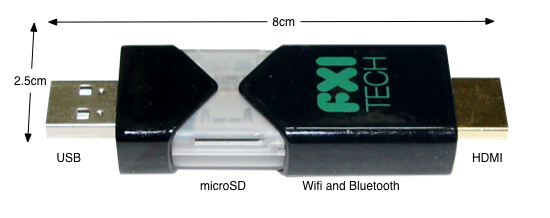
Is that a USB key in your pocket or a dual-core computer? Today, Norwegian company FXI technologies showed off a USB stick-sized portable computer prototype, complete with a dual-core 1.2-GHz Samsung Exynos ARM CPU (same as in the Galaxy S II), 802.11n Wi-Fi, Bluetooth, HDMI-out and a microSD card slot for memory. Codenamed Cotton Candy because its 21 gram weight is the same as a bag of the confection, the tiny PC enables what its inventor calls “Any Screen Computing,” the ability to turn any TV, laptop, phone, tablet, or set-top box into a dumb terminal for its Android operating system.


The Cotton Candy USB computing device by FXI Technologies is a tiny, pocket-sized computer. Photo courtesy of FXI

The Cotton Candy has a USB 2.0 connector on one end and an HDMI jack on the other. When connected to an HDTV, it uses the HDMI port for video, the USB for power, and Bluetooth to connect to a keyboard, mouse, or tablet for controlling the operating system. The device can output up to 1080p so even a full HD screen can display the Candy’s preloaded Android 2.3 operating system at its native resolution. The dual core CPU is powerful enough to play local 1080p video or stream HD clips from the Web.

ZTE Crescent / San Francisco II Smartphone Announced

Orange announced it will launch the Orange San Francisco II, the successor to the award-winning San Francisco smartphone, through Orange shops, Orange telesales and the Orange online shop in late November.

Offering outstanding value innovation, the 3G+ Orange San Francisco II offers everything customers expect from a high-end smartphone.

Building on the success of the Orange San Francisco, the San Francisco II adds a number of innovative features, including HD Voice for clear, crisp call quality, Signal Boost allowing users to benefit from enhanced indoor coverage and Orange Mobile Mail. The handset also features the latest Android gingerbread 2.3 operating system, providing users access to Android Market Place, so they can access thousands of the latest new apps.

The new San Francisco II also includes an improved 800 MHz processor and a 5MP camera – for snapping and sharing quality shots on the move. It also contains a bright, clear 3.5″ WVGA capacitive TFT touch screen, 512 MB of internal memory and a slimmer and more lightweight body – set to build upon the fan base of its popular predecessor.

In addition, several key apps are pre-loaded onto the handset, including: Orange Wednesdays; offering 2-4-1 cinema tickets; Your Orange, allowing you to keep up to date and manage your account, and Orange Contacts Back-up.

The handset also features AGPS, an MP3 player and an inbuilt FM radio to complete the line-up of essentials.

Paul Jevons, Director of Products and Devices, Orange UK said: “The Orange San Francisco II is a fitting successor to the award-winning first model, and offers the latest developments in data, voice and design. We are delighted to be following up on the success of the award winning original with such a full-featured product we expect it to be really popular with consumers in the run up to Christmas”

The San Francisco II will be available exclusively from Orange shops, Orange telesales and orange.co.uk/shop from late November and will be £99 on Orange pay as you go with a £10 top-up and free on 24 month plans of £10.50 per month.

Full specification list:

• Talk Time: 4.5 hours
• Standby Time: 10 days
• Weight: 120g
• Dimensions: 117 x 58.5 x 10.6
• Camera Features: 5 megapixel
• Connectivity: WiFi / Signal Boost / Bluetooth / USB / SatNav
• Music: MP3 / FM Radio
• Network Band: Tri band
• Video: Calling
• Memory: 512 MB / 16Gb Micro SD card supported
• Email: POP3 / IMAP4 / Mobile Mail
• Data Speed: 3G + (HDSPA)
• Operating System: Android
• Version: Gingerbread 2.3
• Other: HD Voice, MobileMail, Orange WiFi, Your Account
• Applications and Features: Orange Maps, Your Orange, Contact Back Up, Mobile Mail, Orange App Store

SwiftKey X 2.2 for Android Smartphones and Tablets

With the launch of its version 2.2 of SwiftKey X and SwiftKey Tablet X, the company is as close as its ever been to delivering the utopian touchscreen typing experience. A faster, artificially intelligent language engine; the best multi-touch keyboard implementation ever experienced; lashing of UI polish… and that’s without mentioning the incredible boost in language coverage.

This new version of SwiftKey continues to set the standard for phone and tablet communication. It has the most powerful language technology that’s ever been engineered for typing on a touchscreen, coupled with a smooth and polished user interface and an ever-growing suite of great features. Those who haven’t tried SwiftKey yet should be asking why; millions of downloads and one of the world’s highest app rankings are just two reasons the company knows that this technology is here to stay.

SWIFTKEY X and SWIFTKEY TABLET X (v. 2.2 UPDATE)

TOP FEATURES:

Full language localization for major European languages
Typing support extended to 35 languages, including Arabic and Hebrew
New multi-touch framework for faster typing
Prediction/correction boosted by faster, more efficient Fluency engine
Full support for Android 4.0 operating system (Ice Cream Sandwich)
UX enhancements, including better settings menu, alternative character selection and sharing features

LANGUAGES, LANGUAGES, LANGUAGES!

With this release of SwiftKey X and SwiftKey Tablet X v2.2, the company has taken a major leap forward with its language support. For the first time, users who primarily communicate in Spanish, French, Italian and German (and perhaps Portuguese – tbc) will have an end-to-end SwiftKey experience in their native tongue (in addition to English, of course).

SwiftKey also now offers typing support for a grand total of 35 languages, giving speakers of everything from Afrikaans to Ukrainian an unrivaled prediction and correction experience as they type. SwiftKey’s latest supported languages are Arabic and Hebrew, and SwiftKey users are of course able to enable up to three languages at once, for a seamless multilingual communication experience.

Full list of supported languages:

Afrikaans

Arabic

Basque

Bulgarian

Catalan

Croatian

Czech

Danish

Dutch

English (UK)

English (US)

Finnish

French (CA)

French (FR)

Galician

German

Greek

Hebrew

Hungarian

Indonesian

Italian

Kazakh

Norwegian

Polish

Portuguese (BR)

Portuguese (PT)

Romanian

Russian

Slovak

Slovenian

Spanish (ES)

Spanish (US)

Swedish

Turkish

Ukrainian

MULTI-TOUCH FOR SPEED FREAKS: SwiftKey redesigned its multi-touch framework to enable the fastest speed typing and accuracy from a touchscreen keyboard yet. Using all the power of our Fluency language inference engine, users can now type at lighting-fast speeds without accuracy and SwiftKey is able to make sense of their multiple, successive key-presses, offering the world’s best personal touchscreen correction experience. We’ve also added the Dvorak and Colemak keyboard layouts for typists who prefer these more efficient options.

A FASTER, MORE EFFICIENT ENGINE: The team of SwiftKey engineers have been hard at work making Fluency, the clever language tech that powers SwiftKey’s corrections and predictions, even faster and more efficient. For the end user, this means SwiftKey will operate faster and use less memory, especially on slower handsets. It’s as if we’ve just doubled the MPG of the SwiftKey engine.

UX POLISH TO MAKE YOU SMILE: SwiftKey version 2.2 is the release that’ll make UX fans smile. The company’s made a range of UX tweaks that improve the overall look and feel of SwiftKey X. This includes the ability to adjust the keyboard key height in both portrait and landscape, an improved implementation of our alternative character selection for users who long-press, and a clear settings menu layout. Other UX improvement highlights include full support for Android 4.0 (Ice Cream Sandwich), an improved menu for sharing SwiftKey with your friends, and a better implementation of the typing heatmap graphic, which shows you how Fluency models your typing accuracy with each key to improve predictions.

Introducing Android 4 Ice Cream Sandwich

Introducing Android 4.0 on Android.com gives a run down on the new Android OS.

“Android 4.0 (Ice Cream Sandwich) is the latest version of the Android platform for phones, tablets, and more. It builds on the things people love most about Android — easy multitasking, rich notifications, customizable home screens, resizable widgets, and deep interactivity — and adds powerful new ways of communicating and sharing.”

Features include:
1. “Roboto,” Android’s own font

2. Even more live wallpapers

3. Newly-designed lock screen

4. Disappearing homescreen command buttons

5. Tabbed apps/widgets drawer similar to Honeycomb

6. Resizeable homescreen widgets

7. Redesigned foldering capabilities

8. Hardware accelerated 2D drawing

9. Wi-Fi Direct support

10. “Favorites Tray” at the bottom of the screen that travels across the different homescreens

11. Native Screen grab capability (Press Power+Volume Down)

12. Improved notification bar, customizable notifications

13. New Music player notification in tray controls player

14. Improved keyboard

15. Improved typing error correction

16. In-line spell check and suggestion mode

17. Cut/Copy/Paste similar to Honeycomb, but with animated dragging and dropping

18. Speech for text entry has been improved with no delay

19. “Face Unlock” facial recognition for unlock screen (Did not work in demo)

20. New Browser (Includes new tab management feature. “request desktop site” feature, syncs to chrome, save pages for offline reading)

21. New Gmail (New action bar with compose, search, labels, refresh; offline search by default that searches the last 30 days of email)

22. New Calendar with pinch-to-zoom

23. Updated all of the native Google apps: YouTube, Maps, Google+, Google Music

24. Mobile data usage metrics in system controls, allows users to self-limit their mobile data consumption, and track data usage down to individual app level

25. All-new camera app with slider zoom, facial detection, “zero shutter lag” speed, launchable from home screen

26. Photo editing tools in “edit” menu in the camera

27. Native panoramic camera shot, similar to Sony’s “Sweep” panorama

28. 1080p video capture, continuous focus, includes the ability to zoom while recording

29. Incredible new Time Lapse photography feature

30. New tile-based “People app” interface for contacts, very similar to Windows Phone

31. “Android Beam” NFC-based content sharing with multiple ICS phones (Web Addresses, contacts, maps, YouTube videos, app sharing)

Adobe Releases Touch Apps for Android Tablets

Adobe Touch Apps Available in Android Market – Six New Tablet Apps Enable Creativity Anywhere, Anytime

Adobe Systems Incorporated announced the availability of the Adobe® Touch Apps in the Android Market. Adobe Touch Apps are a family of six intuitive touch screen applications, inspired by Adobe Creative Suite® software, to bring professional-level creativity to millions of tablet users. Designed to work with both finger and stylus input, the apps address multiple areas of the creative process: Adobe Photoshop® Touch for image editing; Adobe Collage for moodboards; Adobe Debut for presenting and reviewing creative work; Adobe Ideas for sketching; Adobe Kuler® for exploring color themes; and Adobe Proto for website and mobile app prototyping. Announced at MAX 2011 in October, the apps are available today for Android 3.1 or higher. Adobe Ideas is already on iOS and Adobe expects iOS versions of the other five apps to be available in early 2012.

“Our touch apps will be a key component in Adobe’s full Creative Cloud offering, coming in 2012.”

In addition to availability as individual apps, Adobe Touch Apps will be essential components of Adobe Creative Cloud™, a new initiative expected in the first half of 2012. Adobe Creative Cloud will be a worldwide hub for creativity, with membership options that will enable users to access desktop and tablet applications, find essential creative services and share their best work. With the creative file capabilities of Adobe Creative Cloud launched today, files created via Adobe Touch Apps will be able to be shared, viewed across devices or transferred into Adobe Creative Suite software for further refinement – all key features of Adobe’s vision for the Creative Cloud*.

“Adobe Touch Apps will transform how people use tablets – from mere consumption devices to vehicles for expression and creativity,” said David Wadhwani, senior vice president and general manager, Digital Media Business Unit, Adobe. “Our touch apps will be a key component in Adobe’s full Creative Cloud offering, coming in 2012.”

Headlined by Adobe Photoshop Touch, a groundbreaking app that brings the legendary creative and image-editing power of Photoshop to tablet devices for the first time, the new Adobe Touch Apps include:

Adobe Photoshop Touch lets users transform images with core Photoshop features, in an app custom-built for tablets. With simple finger gestures, users can combine multiple photos into layered images, make essential edits, and apply professional effects. The tablet-exclusive Scribble Selection Tool allows users to easily extract objects in an image by simply scribbling on what to keep and, then, what to remove. With Refine Edge technology from Adobe Photoshop, even hard-to-select areas with soft edges are easily captured when making selections. Additionally, the app helps users quickly find images, share creations and view comments through integration with Facebook and Google search. Using Adobe Creative Cloud, files can be accessed and opened in Adobe Photoshop.

Adobe Collage helps creatives capture and refine ideas and concepts by allowing them to combine inspirational images, drawings, text and Creative Suite files into modern, conceptual moodboards. Features include importing of images, four customizable pen types for drawing, adding text and applying color themes. A virtually unconstrained canvas grows as needed to accommodate more assets. Files can be shared or transferred for access in Adobe Photoshop using Adobe Creative Cloud.

Adobe Debut allows users to present designs to clients and stakeholders virtually anywhere. Adobe Debut quickly opens tablet-compatible versions of Creative Suite files for convenient and beautiful viewing on the tablet, including Photoshop layers and Illustrator® art boards. Feedback is gathered using a markup pen tool to add notes and drawings on top of the work.

Adobe Ideas is an easy-to-master, vector-based tool for drawing. By using a stylus or finger, strokes appear smooth at any zoom level. Starting with a blank canvas, users can choose color themes and pull in tablet-compatible image files that can be controlled as separate layers. Finished results are easily accessed in Adobe Illustrator or Photoshop. Adobe Ideas is also currently available for iOS.

Adobe Kuler makes it easy to generate color themes that can inspire any design project. Color can be explored and discovered, with hundreds of thousands of Kuler themes already available via the creative community. Social engagement in the community is enhanced by rating and commenting on themes, which can be exported as color swatches for Adobe Creative Suite projects.

Adobe Proto enables the development of interactive wireframes and prototypes for websites and mobile apps on a tablet. Ideas are communicated and shared with teams and clients using a touch-based interface. Gestures quickly express a design concept, explain website structure or demonstrate interactivity. The wireframe or prototype then can be exported as industry standard HTML, CSS and JavaScript, and shared in popular browsers for immediate review and approval.

To learn more about the Adobe Touch apps, please visit Adobe.com, Adobe TV, Facebook or Twitter. News about the Adobe Creative Cloud can also be found on the Creative Layer blog or Facebook. The new Adobe Touch Apps follow the launch of the Adobe Carousel™ application for iPad, iPhone, iPod touch and Mac OS – an all-new way to browse, enhance and share photos across devices.

Pricing and Availability

The six Adobe Touch Apps for creative professionals are immediately available on the Android Market, at an introductory price of $USD9.99 each. The Touch Apps are available in most geographies in English. The Adobe Touch Apps will run on tablets running Android 3.1 or higher with a minimum 8.9″ screen size and resolution of 1280 x 800. Adobe Ideas is currently available in the iTunes App Store for $USD5.99. Adobe expects iOS versions for all Touch Apps to be available in early 2012. The Adobe Touch Apps integrate with the creative file viewing, sharing and transfer features of the Adobe Creative Cloud also made available today. More information regarding the additional capabilities of Adobe Creative Cloud, including applications, services and community and full Adobe Creative Cloud paid membership options will be available in the first half of 2012.

Verzo Announces Kinzo Android Smartphone

Convinced that the world needs a change from time to time and that the smaller ones who tend to be perceived as weak and irrelevant sometimes need to stand up against the big, the VERZO is coming to the market with its first smartphone called Kinzo. Since the very beginning we wanted to create a phone that would be open to its owners at least as much as the Google Android OS is open to its community. Based on this open source software we wanted to build a phone that would not be the slimmest, the best in performance or the most expensive, but to create a phone that would go its own way and never leave it.

This way is based on differentiation from the great and seemingly untouchable brands by original design and most of all by active communication with clients. We do not want to develop and sell VERZO in the common way: Here you have the new generation of a phone, it’s the best, the most amazing, buy it and for the love of god, leave us alone! We too have our vision which is represented by the Kinzo model, but we also respect and value the opinions of our customers more than anything else.

That is the reason why we are starting the sale of our first model of a smartphone, whose parameters might make the big brands smile for now, but only until you understand our message: The Kinzo is coming to the market with a carefully selected mix of hardware, software, accessories and price, all of which gives you enough space to affect its future development. Together with the community we shall fill the Kinzo and all later VERZO models with widgets, applications and other tweaks to get VERZO to a place on the market where there will be no disdain. Come and build a new brand of smartphones with us.

VERZO and Kinzo in questions and answers

What was supposed to be mentioned in our standpoints, philosophy and world view can be found in the introduction and in our first press release. There is no use in wasting words and using empty phrases, so let us give our first product – the Kinzo smartphone – space to speak for itself. All the technical, practical and other important information can therefore be found in the next paragraphs in the form of questions and answers. So let’s get started:

Question 1: Who is behind VERZO?

On the top of the pyramid is an American company called VERZO TECHNOLOGY LLC. This is the founding company for VERZO Technology s.r.o. – a company based in Prague, Czech Republic. If therefore we say that the VERZO project is a Czech-American one, it is probably the best name for it. The VERZO Technology s.r.o company supervised the development of the design of the phone and the VERZO GUI, and is currently managing the production process and forming the distribution strategy. The VERZO project involved top designers, developers, graphic designers and managers, who have utilised their long experience in their respective fields and brought dynamics and courage to the project.

Only the design of the Kinzo was done outside the VERZO – in the Novague design studio. The aim of the VERZO TECHNOLOGY, LLC is to enter the smartphone market, develop and broaden the product base and become publicly traded company on the American stock exchange.

Question 2: What are the parameters of VERZO Kinzo?

This question can be answered simply: Optimal. Kinzo is not a smartphone that would like to look down on others, boast about how many cores its processor has, how many megapixels the cameras have, how the display is the brightest with the best resolution and so on. The hardware was chosen so it does not limit its users in any aspect, but also not to promise things that cannot be delivered. We wanted to avoid the situation when you would be in need of a processor with better performance, when you would be limited by the size or resolution of the display, or when you would be missing some core feature. At the same time, we did not want to create a smartphone that would be too complicated to use, its battery life too short, but would be full of cores and cameras, and you would not get any accessories except for a charger and a display cleaning cloth worth a few cents.

VERZO Kinzo Specifications:

• OS: Google Android 2.2.
• Processor: 1GHz
• Size: 131,6×72,3×12,3mm (height|width|depth)
• Weight: 155g (with battery)
• Display size: 4.3″
• Display type: TFT, Capacitive Multi-touch screen
• Display resolution: 800×480 pixels
• Camera: 5Mpix (back), VGA (front)
• Battery: SONY Li-Ion 1530 mAh
• Internal memory: 512 MB + 8GB Micro SDHC memory card included (Kinzo supports memory cards up to 32 GB)
• Bluetooth
• Wi-Fi
• GPS

Question 3: Who is our VERZO Kinzo’s competition?

First of all – we are not going to compete with an iPhone. For one, Apple with its current iPhone has quite a head start in development and funding. Also, Apple is mainly trying to appeal to people who put style, design and prestige first. And finally, it is not an android-based device. We think that we should compete with smartphones, which have something in common, therefore VERZO belongs more to the company of smartphones like: Sony Ericsson Xperia ARC, HTC Desire HD, Motorola Milestone, LG Optimus 2X, Nexus One, HTC Desire S, etc. In comparison with these, VERZO Kinzo can offer mostly matching parameters for the same or a slightly lower price, with an extremely rich offering of accessories, free of charge.

Our goal at this time is not to enter the battle for more cores, brightest display or the best camera. We understand that the users are looking for a technologically advanced device, however, we refuse to accept that the quality of a good smartphone should be based only on the number of pixels or the quantity of cores in the processor. In other words – single core processor of 1GHz can many times do a better service than its n-core colleague. Our journey leads through step-by-step advances in parameters, the development of the community and additional widgets.

Question 4: What is included in the price of VERZO Kinzo?

We would like to say that we wanted to make the opening of a new package with the new smartphone into a grand occasion. Global brands have very strict shareholders, who affect the look of the packages not only for smartphones, but for electronics overall. VERZO does not want to give you a cheap carton box with mostly nothing in it. In our luxury package you will find more than just the phone – we also provide many original accessories!

The accessories include a luxurious genuine leather case made in the EU (we always want to have at least one item from the EU or the US in the pack), the smallest USB charger you have ever seen, a luxurious car charger from polished steel, quality headphones, an 8GB Micro SD card and a car holder for your Kinzo. With every new Kinzo you will also be given an offline Navigation app from Sygic with the maps of the whole EU or USA (based on your location). And this is still not all. Every new Kinzo comes with a stylish car holder.

Question 5: What is the price of VERZO Kinzo?

VERZO Kinzo is coming to the European market with the price of 420 EUR and for the customers in the USA the price is set to 459 USD. The price includes the Kinzo phone and the rich accessories as mentioned in the previous answer.

Question 6: How are the purchase and the shipping going to be processed?

The sales start on the 11th of November 2011 via the official VERZO online store accessible at www.verzo.com. In the next weeks we are planning to expand the sales to chosen local retailers and mobile providers. The list of our partners will be constantly updated and available at www.verzo.com. VERZO is shipping the Kinzo worldwide for free. You will not pay a single dollar or euro more.

Question 7: How will the customer service be carried out?

If you experience any difficulties with the Kinzo (which can happen even though we have strict quality control), we will try to resolve the problem as quickly as possible. First you will be directed to our tech-support online, who will attempt to identify the problem. If the technician is not be able to resolve the problem, he will ensure that the device is picked up and sent off to a service and later returned to the customer. You will not have to trouble yourself and look for a place to have your phone serviced. VERZO wants to be in touch with its customers directly and have the possibility to react and help as quickly as possible.

Question 8: What is it exactly this „VERZO community”?

In the VERZO community is where one can meet all the other owners of VERZO devices, who decide to actively participate on the future of the brand. VERZO community starts with the TellME application, which is activated with the registration of a user and the Kinzo smartphone on the official website www.verzo.com, from where it can be downloaded to the phone itself. This application provides the basic means of communication between the users and the VERZO brand.

The users are given the possibility to suggest variety of improvements and mainly applications and widgets, which will be voted for by the rest of the community. The users thus decide which application and widget will be realized. The winning idea or suggestion will be later on available for download for the rest of the users in the following update. The VERZO brand is decided to take a good care of the community and further improve it with the existing and upcoming applications and suggestions.

Question 9: What is it the ‘VERZO GUI’?

VERZO GUI represents our way of thinking about the world of smartphones and most of all our idea about the perfect look of a Google Android OS. VERZO GUI starts with the model Kinzo in its basic layout – with a modified main screen and the status icons, with its own weather widget, contacts visualization, background and some other features. The development of the VERZO GUI will continue in the future, while taking into account the desires of the users. We could have changed the whole system ourselves while hoping that the users will get used to it, but we have decided to show the directions and ask our users about their ideas. What do they like and dislike? What do they find useful and what rather useless? That is the idea behind the VERZO GUI.

Other related questions

1. Why does the Kinzo have a 4.3″ screen?

We believe that the modern multimedia phone needs to have a big screen to be able to fully utilize its potential. That is why we have chosen the 4.3″ screen. The size of the screen directly influences the size of the phone itself.

2. How long will the battery last when using Kinzo?

It is similar or even better than other comparable smartphones on the market. Kinzo has a 1530 mAh battery, which ensures that the Kinzo will be up and running for over a day while used under regular conditions. If used intensively for phone calls, e- mails and web browsing, the Kinzo will have to be charged on a daily basis, however, it will always be up and running at least from dusk till dawn.