Internet

242 posts

EE announces flat-rate unlimited broadband and call packages

EE, the UK’s digital communications company, has launched a range of new unlimited home broadband and call plans designed to make it as simple as possible for customers to choose a great value bundle to meet their needs.

Available immediately across all EE channels including retail shops and online, customers can now choose between one of six unlimited home broadband packages – with the entry level bundle starting from just £5 per month plus line rental. All customers need to do is to choose how fast they want their broadband (between a choice of up to 14 Mbps over standard broadband or up to 38 and up to 76 Mbps over superfast fibre), as well as whether they require only ‘weekend calls’ or an abundance of calls included in their plan (‘anytime and mobile calls’) for only £7 more a month.

Plans with unlimited weekend calls include 0845 and 0870 numbers and for those who want a more inclusive home phone calling option, ‘anytime and mobile calls’ covers unlimited anytime calls to UK landlines and 30 international landline destinations, plus 1,000 anytime minutes to all UK mobiles.

EE’s fibre broadband service now covers more than 50% of UK households and offers speeds typically ten times faster than today’s average broadband speeds**. Fibre broadband from EE allows customers to stream films in HD with plenty of broadband left for the whole family to play games, browse their favourite online shops, or chat to their friends on Facebook – all at the same time. Unlimited Fibre Broadband and calls plans now start from £15 per month plus line rental, making it the best monthly price in the UK for this speed, up to 38 Mbps. What’s more, until the end of June mobile customers can try Fibre for free for the first 3 months – all they have to pay for is line rental and out of bundle call charges if they make any.

The refresh is part of EE’s commitment to offer the best value home broadband packages for mobile customers. All plans come with a year of McAfee Family Protection, EE’s award-winning Bright Box wireless router, and access to a great range of EE benefits, including 2-4-1 cinema tickets as part of EE Film.

Twitter for iOS and Android updated

Twitter have released updates to their iPhone and Android apps. Tweeting is now even easier and more seamless.

Twitter for iOS and Android updated
Photos: When you add a photo to your Tweet, you’ll see a full preview of your photo, not just the cropped version. We’ve also redesigned the experience to make it easy to share a photo from your camera roll: simply click the photo icon on the bottom right corner of the Tweet box. With fewer steps needed to share photos, you can more easily share what’s going on in your life and quickly return to marveling over that gorgeous sunset.

Accounts: When you compose a Tweet, you’ll see your avatar and username, giving you a better sense of how your Tweet will actually appear. If you tweet from multiple accounts, it’s now easier to select the account you want to use by simply tapping on your avatar.

Location: You can still add or remove your location from individual Tweets right from the Tweet box. Tagging your location is a handy way to save characters and provide context.

Read more: https://blog.twitter.com/2013/new-iphone-android-features-better-tweeting-0

Google Calendar for Android adds color highlighting, date and time picker tweaks

Google Calendar for Android gets color highlighting, date and time picker tweaks.

colordatetime
“One of the most requested features we’ve seen so far for Google Calendar on Android is the ability to customize event and calendar colors directly from your device. Today’s update allows you to do just that (Android 4.1 or higher for custom event colors). Now you can highlight those super-urgent meetings and important birthdays, or just switch up the color of your calendar whenever your heart desires

Adding events is now easier and more fun with our redesigned date and time pickers, which let you schedule your special dinner date or the start of your well-deserved vacation in a snap.”

Read more: http://officialandroid.blogspot.co.uk/2013/05/google-calendar-update-for-android.html

Google updates Gmail with tabbed inbox

Google has updated Gmail with tabbed inbox on on desktop and mobile versions.

On the desktop, the new inbox groups your mail into categories which appear as different tabs. You simply choose which categories you want and voilà! Your inbox is organized in a way that lets you see what’s new at a glance and decide which emails you want to read when.

You can easily customize the new inbox – select the tabs you want from all five to none, drag-and-drop to move messages between tabs, set certain senders to always appear in a particular tab and star messages so that they also appear in the Primary tab.

In the Gmail for Android 4.0+ and Gmail for iPhone and iPad apps, you’ll see your Primary mail when you open the app and you can easily navigate to the other tabs.

The new inbox is rolling out gradually. The desktop, Android and iOS versions will become available within the next few weeks. http://gmailblog.blogspot.ca/2013/05/a-new-inbox-that-puts-you-back-in.html

Google combines Drive Gmail and Google+ Photo storage into 15GB

Google has announced instead of having 10 GB for Gmail and another 5 GB for Drive and Google+ Photos, you’ll now get 15 GB of unified storage for free to use as you like between Drive, Gmail, and Google+ Photos.

“With this new combined storage space, you won’t have to worry about how much you’re storing and where. For example, maybe you’re a heavy Gmail user but light on photos, or perhaps you were bumping up against your Drive storage limit but were only using 2 GB in Gmail. Now it doesn’t matter, because you can use your storage the way you want.”

More info: http://googledrive.blogspot.co.uk/2013/05/bringing-it-all-together-15-gb-now.html

Google Earth 7.1 for Android introduces Street View

Google Earth 7.1 for Android has been announced. This new mobile version of Earth includes great new features like the addition of Street View, better search and directions and a streamlined interface.

Google Earth 7.1
Google Earth’s 3D imagery has always been a great way to immerse yourself in the world. With the addition of Street View to Earth for Android, you can now check out the world from the street level too. Simply zoom into an area you’d like to explore and Pegman will appear in the right hand corner. Drag and drop the Pegman into the street and you’ll be greeted by familiar Street View interface. More info: https://plus.google.com/u/0/+GoogleEarth/posts/UJypmc8TdSe

Adding events to Google Calendar from Gmail

You can now add events to Google Calendar from Gmail writes Boris Khvostichenko, Product Manager on the Gmail blog.

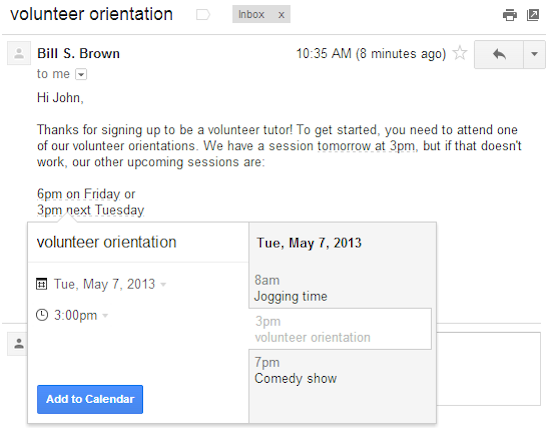
Google Calendar from Gmail
“If you do a lot of scheduling over email, it’s now a little bit easier to create events directly from your Gmail. Starting today, dates and times within emails are lightly underlined: click them to schedule that conference call or lunch date without ever leaving Gmail.

When you click on one of these underlined dates, you’ll be able to preview your schedule for the day and change the title, date or time of the event. Clicking “Add to Calendar” will do exactly that — add the event to your calendar, and for extra convenience, the calendar event will include a link back to the original email.

This new feature is rolling out over the next week to everyone with the English (US) language. We’ll be adding other languages soon”

Twitter updates iOS and Android apps

twitter mobile app
Twitter has updated it’s iOS and Android apps. Both versions gain a clearer look at trends and local Tweets, faster account changing, and bug fixes. In addition to these, the iOS version of Twitter gains the ability to invite friends to Twitter from within the app, improved playback of Vine videos, and more complete conversations that include retweets.

Google Places for Business app

Google have announced it’s Places for Business app. Google Places for Business gives you access to free tools that help your business get online, be found on Google Search and Maps and get closer to your customers. There is also a premium version.

Google Places for Business app

Business owners can use the app to:
– Verify your business listing directly from your phone
– Update your business information: hours, address, contact information, and description
– Post beautiful pictures of your business on your local Google+ page
– Track web traffic going to your listing
– Manage multiple business locations from one app

More info: http://www.google.com/placesforbusiness

UK gets Google Map Maker editing tool

Google is expanding its Map Maker edit tools to the UK.

The browser-based software allows users to add details about buildings, hiking trails, vegetation and other features to its maps of the country.

Suggested additions and amendments are reviewed by other users and the firm’s own staff before going live.

Evernote 5 for Android

Evernote has updated its Android client to version five with New Camera, Evernote Smart Notebook Support, Document Search, Shortcuts, and More.

Evernote 5 for Android

“It looks more beautiful than ever, comes with a great Premium feature, adds a whole new camera with support for our Evernote Smart Notebook, plus a whole lot more.”

More info at: http://blog.evernote.com/blog/2013/03/25/evernote-5-for-android-new-camera-evernote-smart-notebook-support-document-search-shortcuts-and-more-2/

Google Keep note taking service

Google have launched Keep a note taking service that uses Google Drive.

“Every day we all see, hear or think of things we need to remember. Usually we grab a pad of sticky-notes, scribble a reminder and put it on the desk, the fridge or the relevant page of a magazine. Unfortunately, if you’re like me you probably often discover that the desk, fridge or magazine wasn’t such a clever place to leave the note after all…it’s rarely where you need it when you need it.” Read more at: http://googledrive.blogspot.co.uk/2013/03/google-keepsave-whats-on-your-mind.html