Monthly Archives: November 2011

34 posts

Glidetrack announces mobislyder for iPhone, Android smart phones, smaller DSLR cameras and mini camcorders

The mobislyder, a new innovation from Glidetrack, the world’s leading camera slider company, is set to revolutionise mobile device video production. Stylish and ultraportable, the mobislyder has been designed from the ground up to suit a broad range of small video-enabled devices – including iPhone, Android smart phones, smaller DSLR cameras and mini camcorders.

As video on demand becomes the medium of choice for businesses and individuals the mobislyder provides professionals and amateurs alike with the ability to create cinematic-style shots.

“For years sophisticated-looking camera moves were only available to professionals with big budgets and truck loads of gear. But now, with most camera devices capable of shooting HD video, mobislyder allows operators to take smooth tracking shots fit for the big screen -all with the sweep of a finger,” said Alastair Brown, the 43-year-old UK entrepreneur who founded Glidetrack in 2008.

The name Glidetrack has now become synonymous with these types of cinematic gliding moves. There are literally thousands of user videos on YouTube and Vimeo created by people using the equipment to enhance the quality of their productions.

“We have been working on creating a smaller Glidetrack-style piece of equipment suitable for mobile devices such as iPhone and compact cameras for some time but until now the video quality wasn’t quite there,” said Alastair. “However, with the development of the iPhone 4S and other new generation devices capable of shooting full high definition video we fele the time was right to launch the mobislyder.”

The new device, which retails at around £129 ($175 USD) but is being made available at a special launch price of £99 ($135 USD) in the run up to Christmas, is perfect for special occasions such as weddings, concerts, holidays, sports events, social media news reporting and even corporate promotions and PR videos.

With more than 200,000 videos uploaded to YouTube, and in excess of 1 billion views, every day the demand for good quality user generated content on the web is booming, especially among companies getting to grips with the value of video.

Various surveys into the impact of video suggests news releases with video links have a 300 per cent higher retention rate and 500 per cent more views than text only versions. Products promoted with video have reported increased sales of between 17 per cent and 36 per cent.

According to the latest industry figures total online video views are on track to grow by some 20% from 640billion last year to around 770billion this year while paid-for online video revenues will reach in excess of $3bn (USD). And with experts predicting sales of smartphones to exceed more than 450million worldwide this year volume is set to increase even more.

However, the more videos there are the more demanding and selective viewers are becoming.

“The days of shaky video being posted online are gone. People are becoming more demanding about what they watch which means companies or individuals need to improve the quality of their videos and mobislyder can help them do that,” added Alastair.

“We see mobislyder as becoming the industry standard piece of gear for Ebay sellers, Amazon product videos, Bloggers – in fact anyone wanting to get high quality video on their site without breaking the bank.”

Box.net Offers Sony Ericsson Xperia Android Phones Users 50GB of Free Cloud Storage

Until December 31st 2012, Box.net is offering Sony Ericsson Xperia Android smartphone users 50GB of Free Cloud Storage.

Store, retrieve and edit files from any device, with only one copy in the cloud. Box.net specializes in synchronizing their services across different devices. Brilliant, we think.

Simply log in to your Box.net account from any Sony Ericsson Xperia Android handset before December 31st 2012. That’s it. Once you have done that you have 50GB free cloud storage on your account for life.

http://www.box.com/features/complete_list/

WordPress, Joomla! and Drupal Dominate Open Source CMS

PHP-based systems WordPress, Joomla! and Drupal continue to dominate the web content management space. But, while the Big 3 remain unchanged from last year, the Report concludes that WordPress has re-taken the overall lead from Joomla! While the Big 3 remain unchanged from last year, the Report concludes that WordPress retains a clear lead in the face of decreasing competition from Joomla!.

“WordPress turned in another strong year, clearly outpacing both Joomla! and Drupal,” notes lead analyst Ric Shreves. “Looking beyond the Big 3 we find a considerable amount of movement in the market, with several smaller systems turning in solid performances this year. Concrete5, in particular, had a very strong year.”

Though PHP-based systems remain the populist choice, the survey places two .NET and three Java systems in the Top 20. DotNetNuke remained the market leader in the .NET space. In the Java WCM space, Liferay and Alfresco are fighting a closely matched battle.

The findings in this year’s report were based on a survey of more than 2,500 CMS users, together with research into a wide variety of measures of market share and brand strength.

The Open Source CMS Market Share Report was launched in 2008 by digital agency water&stone. The Report is non-commercial and released under an open license. Since its inception, the Open Source CMS Market Share Report has become the industry standard for purpose of defining market share and adoption rates in the open source content management system market.

You can download a copy of the 2011 Open Source CMS Market Share Report from http://www.waterandstone.com/book/2011-open-source-cms-market-share-report

Google Drops Seven Services Including Wave and Gears

Google is killing off seven more products including Wave in an effort to simplify its range of services, reports Google in its official blog.

The products being dropped are:
Google Wave – an attempt to combine email and instant messaging for real-time collaboration

Google Bookmarks List – a service which allowed users to share bookmarks with friends

Google Friends Connect – allowed webmasters to add social features to their sites by embedding a snippet of code

Google Gears – much-hyped effort to maintain web browser functionality when working offline

Google Search Timeline – a graph of historical query results

Knol – a Wikipedia-style project, which aimed to improve web content

Renewable Energy Cheaper than Coal – a project which aimed to find ways to improve solar power

Partnership brings Pogoplug Cloud to Drobo customers, for remote file access, cloud storage and media streaming from any device

Drobo, makers of award-winning data storage products for businesses and professionals, and Pogoplug, creators of the award-winning line of streaming and sharing devices, today announced a partnership to deliver a comprehensive personal cloud solution for anytime, anywhere access to files. Drobo customers will have access to free cloud storage, remote file access and digital media streaming using Pogoplug Cloud, a new service announced last week.

Using Pogoplug Cloud, customers can turn their Drobo into a multi-terabyte private cloud that provides secure, remote access to their entire digital library of documents, movies, photographs, games and music files. The agreement between Drobo and Pogoplug also provides Drobo users with 10GB of free public cloud storage – ideal for syncing valuable files between Drobo and the cloud.

“Small businesses, professionals, and consumers already store large collections of files on their Drobo,” said Tom Buiocchi, CEO of Drobo. “Adding remote access, media streaming and other cloud capabilities turns the Drobo into the ultimate personal cloud – combining the simple, reliable storage Drobo users have come to expect with the flexibility and freedom of the cloud.”

Designed specifically for customers who require storage capacity without the complexity and price of legacy storage, Drobo delivers sophisticated yet easy-to-use and affordable storage solutions for professionals and businesses. Every Drobo is powered by the patented BeyondRAID technology that automates traditional storage challenges such as data protection, capacity expansion, and application performance optimization.

“Digital media content has exploded as a major part of our lives, but requires huge amounts of storage, ” said Daniel Putterman, CEO and co-founder of Cloud Engines. “The partnership with Drobo delivers a seamless hybrid cloud experience for professionals and consumers alike to access and stream stored digital media and personal content.”

Pogoplug Cloud, delivered by Cloud Engines, has changed the way personal content is stored and delivered over the Internet with the advent of its personal cloud. Pogoplug Cloud provides secure storage of digital media from any location, enabling users to access, share and stream their content from a mobile or connected device. Together Drobo and Pogoplug Cloud offer customers with large personal media files remote access to these files under the security of linking a Drobo appliance to a personal cloud.

Customers interested in the new offering can find more information at www.drobo.com/pogoplug.

Botta-Design DUO 24 One Hand Watch for Two Time Zone

Botta design presents the world’s first dual one-hand-watch for two time zones

Our world may be becoming smaller, but one boundary still remains – time.

Before we contact someone in another time zone, we always find ourselves wondering what time it is there – is it early in the morning or late at night? Will my call be a disturbance, or will it come just in time?

The DUO 24 offers a simple solution to this problem: being a dual one-hand watch, it shows both the local time and the time at one additional time zone, using just one hand in each case.

This is the simple yet amazingly logical principle which the DUO 24 uses to give its wearer reassurance when dealing with different time zones.

The main display on the outside shows the local time. The striking 12-hour hand points to the specially developed one-hand scale familiar for more than 25 years from the UNO.

The second time zone is shown, somewhat less prominently, next to the local time. The 24-hour numerical ring and the delicate hand are situated on a lower display level and are clearly separated from the 12-hour display. An artificial horizon divides the dial into a day half and a night half – making sure that unwanted alarm calls are a thing of the past.

The DUO 24 is the ideal dual one-hand watch for anyone at home in two worlds.

Klaus Botta has been designing and creating wristwatches for clients like Junghans AG, Bestform and Watch People since 1986. Botta-Design wristwatches have already received over 40 renowned design awards, both in Germany and abroad. Some of them are exhibited in the Chicago Museum of Architecture and Design and the Museum für angewandte Kunst (Museum of Applied Art) in Frankfurt.
Watches from Botta-Design are characterized by a concentration on the bare essentials. The salient design features of every Botta-Design wristwatch are functional clarity and a high degree of technical aesthetic which is underlined by the choice of materials and the precision of the workmanship.

Botta-Design
Klosterstraße 15a
61462 Königstein im Taunus
Germany
[email protected]
Tel.:+49 6174 961188
Fax:+49 6174 961189

Android USB Stick for PCs TVs

FXI technologies USB Stick Contains Dual-Core Computer Turns Any Screen Into an Android Station, reports Laptopmag

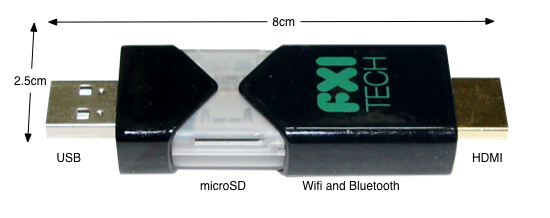
Is that a USB key in your pocket or a dual-core computer? Today, Norwegian company FXI technologies showed off a USB stick-sized portable computer prototype, complete with a dual-core 1.2-GHz Samsung Exynos ARM CPU (same as in the Galaxy S II), 802.11n Wi-Fi, Bluetooth, HDMI-out and a microSD card slot for memory. Codenamed Cotton Candy because its 21 gram weight is the same as a bag of the confection, the tiny PC enables what its inventor calls “Any Screen Computing,” the ability to turn any TV, laptop, phone, tablet, or set-top box into a dumb terminal for its Android operating system.


The Cotton Candy USB computing device by FXI Technologies is a tiny, pocket-sized computer. Photo courtesy of FXI

The Cotton Candy has a USB 2.0 connector on one end and an HDMI jack on the other. When connected to an HDTV, it uses the HDMI port for video, the USB for power, and Bluetooth to connect to a keyboard, mouse, or tablet for controlling the operating system. The device can output up to 1080p so even a full HD screen can display the Candy’s preloaded Android 2.3 operating system at its native resolution. The dual core CPU is powerful enough to play local 1080p video or stream HD clips from the Web.

PayPal Launches Send Money Facebook App

PayPal has announced Send Money a Facebook app designed to let users of the social networking site send money to each other.

Send Money, features a greeting card component for accompanying the money transfer with an e-card containing a message, photos and videos to mark occasions like birthdays and anniversaries.

“In a world that’s turning increasingly to social media, we are giving our customers the flexibility to send their money to whoever they want, whenever they want and for whatever ‘occasion’ they want,” wrote JB Coutinho, a senior product marketing manager at PayPal, in a blog post

To use the app visit PayPal’s send money app page on Facebook. You select a card for your occasion and choose a recipient. Simply log-in to your PayPal account within the app, choose the dollar amount and click send. The card is immediately posted to the recipient’s wall though the message of the card is kept private.

ZTE Crescent / San Francisco II Smartphone Announced

Orange announced it will launch the Orange San Francisco II, the successor to the award-winning San Francisco smartphone, through Orange shops, Orange telesales and the Orange online shop in late November.

Offering outstanding value innovation, the 3G+ Orange San Francisco II offers everything customers expect from a high-end smartphone.

Building on the success of the Orange San Francisco, the San Francisco II adds a number of innovative features, including HD Voice for clear, crisp call quality, Signal Boost allowing users to benefit from enhanced indoor coverage and Orange Mobile Mail. The handset also features the latest Android gingerbread 2.3 operating system, providing users access to Android Market Place, so they can access thousands of the latest new apps.

The new San Francisco II also includes an improved 800 MHz processor and a 5MP camera – for snapping and sharing quality shots on the move. It also contains a bright, clear 3.5″ WVGA capacitive TFT touch screen, 512 MB of internal memory and a slimmer and more lightweight body – set to build upon the fan base of its popular predecessor.

In addition, several key apps are pre-loaded onto the handset, including: Orange Wednesdays; offering 2-4-1 cinema tickets; Your Orange, allowing you to keep up to date and manage your account, and Orange Contacts Back-up.

The handset also features AGPS, an MP3 player and an inbuilt FM radio to complete the line-up of essentials.

Paul Jevons, Director of Products and Devices, Orange UK said: “The Orange San Francisco II is a fitting successor to the award-winning first model, and offers the latest developments in data, voice and design. We are delighted to be following up on the success of the award winning original with such a full-featured product we expect it to be really popular with consumers in the run up to Christmas”

The San Francisco II will be available exclusively from Orange shops, Orange telesales and orange.co.uk/shop from late November and will be £99 on Orange pay as you go with a £10 top-up and free on 24 month plans of £10.50 per month.

Full specification list:

• Talk Time: 4.5 hours
• Standby Time: 10 days
• Weight: 120g
• Dimensions: 117 x 58.5 x 10.6
• Camera Features: 5 megapixel
• Connectivity: WiFi / Signal Boost / Bluetooth / USB / SatNav
• Music: MP3 / FM Radio
• Network Band: Tri band
• Video: Calling
• Memory: 512 MB / 16Gb Micro SD card supported
• Email: POP3 / IMAP4 / Mobile Mail
• Data Speed: 3G + (HDSPA)
• Operating System: Android
• Version: Gingerbread 2.3
• Other: HD Voice, MobileMail, Orange WiFi, Your Account
• Applications and Features: Orange Maps, Your Orange, Contact Back Up, Mobile Mail, Orange App Store

SwiftKey X 2.2 for Android Smartphones and Tablets

With the launch of its version 2.2 of SwiftKey X and SwiftKey Tablet X, the company is as close as its ever been to delivering the utopian touchscreen typing experience. A faster, artificially intelligent language engine; the best multi-touch keyboard implementation ever experienced; lashing of UI polish… and that’s without mentioning the incredible boost in language coverage.

This new version of SwiftKey continues to set the standard for phone and tablet communication. It has the most powerful language technology that’s ever been engineered for typing on a touchscreen, coupled with a smooth and polished user interface and an ever-growing suite of great features. Those who haven’t tried SwiftKey yet should be asking why; millions of downloads and one of the world’s highest app rankings are just two reasons the company knows that this technology is here to stay.

SWIFTKEY X and SWIFTKEY TABLET X (v. 2.2 UPDATE)

TOP FEATURES:

Full language localization for major European languages
Typing support extended to 35 languages, including Arabic and Hebrew
New multi-touch framework for faster typing
Prediction/correction boosted by faster, more efficient Fluency engine
Full support for Android 4.0 operating system (Ice Cream Sandwich)
UX enhancements, including better settings menu, alternative character selection and sharing features

LANGUAGES, LANGUAGES, LANGUAGES!

With this release of SwiftKey X and SwiftKey Tablet X v2.2, the company has taken a major leap forward with its language support. For the first time, users who primarily communicate in Spanish, French, Italian and German (and perhaps Portuguese – tbc) will have an end-to-end SwiftKey experience in their native tongue (in addition to English, of course).

SwiftKey also now offers typing support for a grand total of 35 languages, giving speakers of everything from Afrikaans to Ukrainian an unrivaled prediction and correction experience as they type. SwiftKey’s latest supported languages are Arabic and Hebrew, and SwiftKey users are of course able to enable up to three languages at once, for a seamless multilingual communication experience.

Full list of supported languages:

Afrikaans

Arabic

Basque

Bulgarian

Catalan

Croatian

Czech

Danish

Dutch

English (UK)

English (US)

Finnish

French (CA)

French (FR)

Galician

German

Greek

Hebrew

Hungarian

Indonesian

Italian

Kazakh

Norwegian

Polish

Portuguese (BR)

Portuguese (PT)

Romanian

Russian

Slovak

Slovenian

Spanish (ES)

Spanish (US)

Swedish

Turkish

Ukrainian

MULTI-TOUCH FOR SPEED FREAKS: SwiftKey redesigned its multi-touch framework to enable the fastest speed typing and accuracy from a touchscreen keyboard yet. Using all the power of our Fluency language inference engine, users can now type at lighting-fast speeds without accuracy and SwiftKey is able to make sense of their multiple, successive key-presses, offering the world’s best personal touchscreen correction experience. We’ve also added the Dvorak and Colemak keyboard layouts for typists who prefer these more efficient options.

A FASTER, MORE EFFICIENT ENGINE: The team of SwiftKey engineers have been hard at work making Fluency, the clever language tech that powers SwiftKey’s corrections and predictions, even faster and more efficient. For the end user, this means SwiftKey will operate faster and use less memory, especially on slower handsets. It’s as if we’ve just doubled the MPG of the SwiftKey engine.

UX POLISH TO MAKE YOU SMILE: SwiftKey version 2.2 is the release that’ll make UX fans smile. The company’s made a range of UX tweaks that improve the overall look and feel of SwiftKey X. This includes the ability to adjust the keyboard key height in both portrait and landscape, an improved implementation of our alternative character selection for users who long-press, and a clear settings menu layout. Other UX improvement highlights include full support for Android 4.0 (Ice Cream Sandwich), an improved menu for sharing SwiftKey with your friends, and a better implementation of the typing heatmap graphic, which shows you how Fluency models your typing accuracy with each key to improve predictions.

Introducing Android 4 Ice Cream Sandwich

Introducing Android 4.0 on Android.com gives a run down on the new Android OS.

“Android 4.0 (Ice Cream Sandwich) is the latest version of the Android platform for phones, tablets, and more. It builds on the things people love most about Android — easy multitasking, rich notifications, customizable home screens, resizable widgets, and deep interactivity — and adds powerful new ways of communicating and sharing.”

Features include:
1. “Roboto,” Android’s own font

2. Even more live wallpapers

3. Newly-designed lock screen

4. Disappearing homescreen command buttons

5. Tabbed apps/widgets drawer similar to Honeycomb

6. Resizeable homescreen widgets

7. Redesigned foldering capabilities

8. Hardware accelerated 2D drawing

9. Wi-Fi Direct support

10. “Favorites Tray” at the bottom of the screen that travels across the different homescreens

11. Native Screen grab capability (Press Power+Volume Down)

12. Improved notification bar, customizable notifications

13. New Music player notification in tray controls player

14. Improved keyboard

15. Improved typing error correction

16. In-line spell check and suggestion mode

17. Cut/Copy/Paste similar to Honeycomb, but with animated dragging and dropping

18. Speech for text entry has been improved with no delay

19. “Face Unlock” facial recognition for unlock screen (Did not work in demo)

20. New Browser (Includes new tab management feature. “request desktop site” feature, syncs to chrome, save pages for offline reading)

21. New Gmail (New action bar with compose, search, labels, refresh; offline search by default that searches the last 30 days of email)

22. New Calendar with pinch-to-zoom

23. Updated all of the native Google apps: YouTube, Maps, Google+, Google Music

24. Mobile data usage metrics in system controls, allows users to self-limit their mobile data consumption, and track data usage down to individual app level

25. All-new camera app with slider zoom, facial detection, “zero shutter lag” speed, launchable from home screen

26. Photo editing tools in “edit” menu in the camera

27. Native panoramic camera shot, similar to Sony’s “Sweep” panorama

28. 1080p video capture, continuous focus, includes the ability to zoom while recording

29. Incredible new Time Lapse photography feature

30. New tile-based “People app” interface for contacts, very similar to Windows Phone

31. “Android Beam” NFC-based content sharing with multiple ICS phones (Web Addresses, contacts, maps, YouTube videos, app sharing)

TP-Link Portable 3G Wireless N USB Router

Create a Wi-Fi Hotspot Anywhere with TP-LINK’s New 150Mbps Wireless N Mini Pocket Router and Portable 3G/3.75G Wireless N Router

TP-LINK, a global provider of networking products, today announces two new Portable Wireless N Routers, designed to provide high-speed Internet access anywhere you go. Both routers are ideal for connecting tablet computers, smart phones, portable gaming consoles, and other mobile electronic devices while on-the-go.

The new 150Mbps Wireless N Mini Pocket Router (TL-WR700N) can be used to create an instant Wi-Fi hotspot by plugging in an Ethernet cable from your existing network or modem. It is a smart solution to efficiently expand your wireless network for the use of Wi-Fi enabled laptops, mobile phones, tablets, game consoles and more. The Mini Pocket Router operates as an Access Point to create a Wi-Fi hotspot from a wired source. It also functions as a Wireless Router, Range Extender or Wireless Bridge. The stylish cube design is small enough to fit into your pocket and plugs right into an electrical outlet without the hassle of using a power cord.

TP-LINK also introduces its new Portable 3G/3.75G Wireless N Router (TL-MR3020) which connects to the Internet via 3G cellular networks – the same network that your mobile phone uses – to keep you online and connected anywhere. Simply plug in the 3G USB modem to TL-MR3020 and establish a Wi-Fi hotspot instantly. With its travel-size design, TL-MR3020 is compact enough to take on the road and share its 3G Internet connection wherever coverage is available. The device comes with three adjustable modes: 3G Router Mode, WISP Client Router Mode, and Access Point Mode. Additionally it can be used as a Wireless Router, Range Extender or Wireless Bridge. The router can be powered through a USB connection or external power adapter, both included with the device.

150Mbps Wireless N Mini Pocket Router (TL-WR700N) – $29.99 – Available 11/23/11

Wireless N speeds of up to 150Mbps*

Compact, sleek design

Fully compliant with 2.4GHz-2.4835GHz Wireless Frequency

Supports AP, Bridge, Repeater (Range Extender), Wireless Router operation modes

Compatible with any Wi-Fi enabled devices, such as iPhoneTM, iPadTM, AndroidTM Phones, KindleTM, game consoles and other entertainment devices

Advanced security and encryptions

Portable 3G/3.75G Wireless N Router (TL-MR3020) – $39.99 – Available 12/14/11

Wireless N speeds of up to 150Mbps*

Compact design, ideal for travel

Compatible with UMTS/HSPA/EVDO USB 3G Modems

Fully compliant with 2.4GHz-2.4835GHz Wireless Frequency

Supports 3G Router, AP, Bridge, Repeater (Range Extender), Wireless Router, WISP Client operation modes

Powered by USB connection or external power adapter

Compatible with any Wi-Fi enabled devices, such as iPhoneTM, iPadTM, AndroidTM Phones, KindleTM, game consoles and other entertainment devices

Advanced security and encryptions

TP-LINK products are available at Fry’s Electronics, Micro Center, B&H and Data Vision. You can also find them online at Newegg.com, Amazon.com, http://www.mwave.com/mwave/index.asp? Tigerdirect.com, Walmart.com and Buy.com.

*Actual data will vary because of the network conditions and environmental factors