BBC announces weather app on Android and iOS

BBC Weather today launched a mobile application for iOS and Android devices in the UK. The free app enables you to keep ahead of the weather by taking BBC Weather’s accurate and in-depth information with you on-the-go.

BBC announces weather app
As soon as you open the app it will automatically detect your location and give you an instant overview of the weather conditions wherever you are. It also gives quick access to the 5-day forecast with the option to look up further detail such as hourly UK forecasts, and three hourly forecasts for international locations, for the next 48 hours. You can find other destinations from the UK and abroad with a simple search and save them to a customisable list of your favourite places.

The app lets you make the most of this summer’s big events with Glastonbury, Wimbledon and the British Grand Prix all approaching. With regular updates for the weather and other information including UV, pollen count, wind speed and humidity, you’ll always know when to take out the brolly, put on the sun screen, or stock-up on hay fever supplies. And when the summer has been and gone, you can still keep ahead of the snow, sleet and showers.

The app follows a huge increase in users accessing BBC Weather’s services from mobile devices over the last year, and brings the breadth of its highly trusted information into a simple, clean and intuitive design. The look and feel is consistent across iOS and Android with subtle differences, such as navigation and search, that are designed to be instantly familiar to users of each platform.

All information and data can be found in either version of the app, but Android users can also add a widget on the device’s home screen and share favourite locations over NFC (Near-Field Communications) by simply touching two compatible devices together.

Liz Howell, Head of BBC Weather, said: “The new BBC Weather app is the perfect companion for this summer’s great British sport and music events. We know that our audiences really want that at-a-glance forecast when they’re out and about, with the option of digging for further detail when they need or want to. That’s exactly what we’ve delivered, squeezing in all of our trusted data into an app that’s simple to use and looks fantastic.”

James Metcalfe, Senior Product Manager for Weather, BBC Future Media, said: “We’re making BBC Weather truly mobile with the launch of our new app. As so many of our audiences access BBC Weather from iOS and Android devices, we can now offer them an even better way to keep ahead of the weather on-the-go. This represents a significant milestone in our commitment to provide a world-class weather service to audiences across four screens – desktop, mobile, tablet and connected TV.”

The app is freely available to download now on iOS from the Apple iTunes App Store and on Android via Google Play.

Twitter for iOS and Android updated

Twitter have released updates to their iPhone and Android apps. Tweeting is now even easier and more seamless.

Twitter for iOS and Android updated
Photos: When you add a photo to your Tweet, you’ll see a full preview of your photo, not just the cropped version. We’ve also redesigned the experience to make it easy to share a photo from your camera roll: simply click the photo icon on the bottom right corner of the Tweet box. With fewer steps needed to share photos, you can more easily share what’s going on in your life and quickly return to marveling over that gorgeous sunset.

Accounts: When you compose a Tweet, you’ll see your avatar and username, giving you a better sense of how your Tweet will actually appear. If you tweet from multiple accounts, it’s now easier to select the account you want to use by simply tapping on your avatar.

Location: You can still add or remove your location from individual Tweets right from the Tweet box. Tagging your location is a handy way to save characters and provide context.

Read more: https://blog.twitter.com/2013/new-iphone-android-features-better-tweeting-0

Google Calendar for Android adds color highlighting, date and time picker tweaks

Google Calendar for Android gets color highlighting, date and time picker tweaks.

colordatetime
“One of the most requested features we’ve seen so far for Google Calendar on Android is the ability to customize event and calendar colors directly from your device. Today’s update allows you to do just that (Android 4.1 or higher for custom event colors). Now you can highlight those super-urgent meetings and important birthdays, or just switch up the color of your calendar whenever your heart desires

Adding events is now easier and more fun with our redesigned date and time pickers, which let you schedule your special dinner date or the start of your well-deserved vacation in a snap.”

Read more: http://officialandroid.blogspot.co.uk/2013/05/google-calendar-update-for-android.html

Google updates Gmail with tabbed inbox

Google has updated Gmail with tabbed inbox on on desktop and mobile versions.

On the desktop, the new inbox groups your mail into categories which appear as different tabs. You simply choose which categories you want and voilà! Your inbox is organized in a way that lets you see what’s new at a glance and decide which emails you want to read when.

You can easily customize the new inbox – select the tabs you want from all five to none, drag-and-drop to move messages between tabs, set certain senders to always appear in a particular tab and star messages so that they also appear in the Primary tab.

In the Gmail for Android 4.0+ and Gmail for iPhone and iPad apps, you’ll see your Primary mail when you open the app and you can easily navigate to the other tabs.

The new inbox is rolling out gradually. The desktop, Android and iOS versions will become available within the next few weeks. http://gmailblog.blogspot.ca/2013/05/a-new-inbox-that-puts-you-back-in.html

Twitter for Mac 2.2.1

Twitter has released Twitter for Mac 2.2.1 including Notification Center integration: receive notifications when someone mentions you or when you receive a Direct Message. You can configure this from the app’s Preferences window.

Twitter for Mac 2.2.1

This update also includes the following changes:
* Fix for Growl notifications not working in Lion and Mountain Lion
* Fix for bug that prevented un-favoriting tweets
* Fix for missing account switcher in composer
* Fix for error message when posting a tweet with a pasted image
* Fix for enlarged avatar when dragging a tweet into an email
* Fixes for crashes and various other bugs

Download: https://itunes.apple.com/us/app/twitter/id409789998?mt=12

Google combines Drive Gmail and Google+ Photo storage into 15GB

Google has announced instead of having 10 GB for Gmail and another 5 GB for Drive and Google+ Photos, you’ll now get 15 GB of unified storage for free to use as you like between Drive, Gmail, and Google+ Photos.

“With this new combined storage space, you won’t have to worry about how much you’re storing and where. For example, maybe you’re a heavy Gmail user but light on photos, or perhaps you were bumping up against your Drive storage limit but were only using 2 GB in Gmail. Now it doesn’t matter, because you can use your storage the way you want.”

More info: http://googledrive.blogspot.co.uk/2013/05/bringing-it-all-together-15-gb-now.html

Google Earth 7.1 for Android introduces Street View

Google Earth 7.1 for Android has been announced. This new mobile version of Earth includes great new features like the addition of Street View, better search and directions and a streamlined interface.

Google Earth 7.1
Google Earth’s 3D imagery has always been a great way to immerse yourself in the world. With the addition of Street View to Earth for Android, you can now check out the world from the street level too. Simply zoom into an area you’d like to explore and Pegman will appear in the right hand corner. Drag and drop the Pegman into the street and you’ll be greeted by familiar Street View interface. More info: https://plus.google.com/u/0/+GoogleEarth/posts/UJypmc8TdSe

Adding events to Google Calendar from Gmail

You can now add events to Google Calendar from Gmail writes Boris Khvostichenko, Product Manager on the Gmail blog.

Google Calendar from Gmail
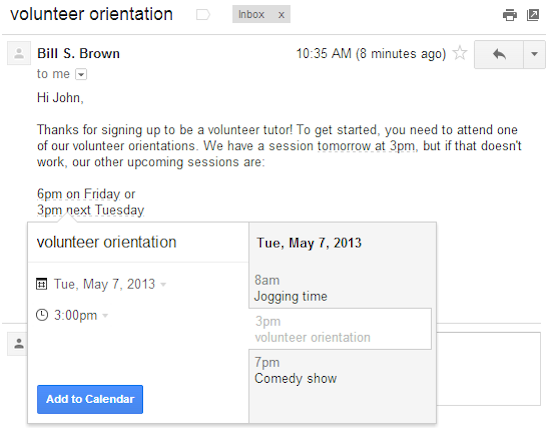
“If you do a lot of scheduling over email, it’s now a little bit easier to create events directly from your Gmail. Starting today, dates and times within emails are lightly underlined: click them to schedule that conference call or lunch date without ever leaving Gmail.

When you click on one of these underlined dates, you’ll be able to preview your schedule for the day and change the title, date or time of the event. Clicking “Add to Calendar” will do exactly that — add the event to your calendar, and for extra convenience, the calendar event will include a link back to the original email.

This new feature is rolling out over the next week to everyone with the English (US) language. We’ll be adding other languages soon”

Twitter updates iOS and Android apps

twitter mobile app
Twitter has updated it’s iOS and Android apps. Both versions gain a clearer look at trends and local Tweets, faster account changing, and bug fixes. In addition to these, the iOS version of Twitter gains the ability to invite friends to Twitter from within the app, improved playback of Vine videos, and more complete conversations that include retweets.

Kingston Digital Announces Wireless Reader, Battery Charger for Apple, Android Mobile Devices

Kingston Digital, Inc., announced the release of MobileLite Wireless. MobileLite Wireless is the next generation of the innovative Wi-Drive® portable wireless storage device Kingston® released in 2011, for Apple and Android devices. The new reader is enhanced as it wirelessly streams movies, music, photos and documents from USB Flash drives, microSD (with included adapter) and SD/SDHC/SDXC cards. MobileLite Wireless also serves as an emergency mobile charger when the user’s phone battery gets low.

MobileLite Wireless

Kingston’s new MobileLite Wireless is the ultimate companion to keep up with one’s active lifestyle, giving users access to unprecedented mobile essentials at a great price. It is as easy as plugging in any USB Flash drive into the USB port to quickly watch and share movies or view and share files wirelessly on mobile devices. The SD/SDHC/SDXC slot enables fast, easy sharing of images with friends and family by removing the card from a camera and plugging it directly into the MobileLite Wireless. The included adapter allows the same access and sharing for microSD cards used in many mobile phones and tablets.
??????
MobileLite Wireless also serves as an emergency backup battery charger to keep devices going longer. The charging feature works with most mobile phones as it charges them via the device’s USB slot. MobileLite Wireless has a rechargeable battery which can handle up to five hours of continuous use as a wireless reader, easily handling long road trips.
MobileLite Wireless allows streaming and sharing of data with up to three users simultaneously. Like the Wi-Drive, the new device allows simultaneous connections to both device and router via Wi-Fi so, for example, one can stream music and browse the Internet at the same time. The MobileLite Wireless app is available now for Apple devices and soon for Android and Kindle Fire. Support for Windows Phone OS, Windows PC and Mac are forthcoming.

“When we released Wi-Drive, our customers loved the idea of storing and sharing content from a wireless device but wanted additional slots to plug in everyday items like USBs and cards. We listened to them through the entire process,” said Craig Tilmont, wireless products business manager, Kingston. “MobileLite Wireless is really easy to use but just in case, we created videos and even a simple walkthrough tutorial when people first access the app. One thing people often forget is that Kingston offers free technical support. We are here to help people set it up if needed. I think once people give this product a try, they will recommend it to their friends.”

The feature-rich MobileLite Wireless has a suggested price of $69.99 USD. It is available via e-tail in the United States at Amazon.com, and will be carried in the coming weeks at Staples retail locations. It will be available globally soon via a ramped regional rollout.
A video with a demonstration of the MobileLite Wireless is available here. The MobileLite Wireless is backed by a one-year warranty, free technical support and legendary Kingston reliability. For more information, visit www.kingston.com. For a full list of videos explaining how easy the MobileLite Wireless is to use, please visit our product page.

Kingston is celebrating 25 years in the memory industry. The company was founded on October 17, 1987, and has grown to become the largest third-party memory manufacturer in the world. The 25th anniversary video can be found here, along with more information, including a timeline of Kingston’s history. In addition, HyperX memory is celebrating its 10th anniversary. The first HyperX high-performance memory module was released in November 2002.

Sony Announces the Cyber-shot HX50V 30x Optical Zoom Camera

Sony introduced the Cyber-shot™ HX50 camera – a powerful new compact featuring an impressive 30x optical zoom range and advanced 20.4 MP “Exmor R” CMOS image sensor. Measuring approximately 4.4″x2.6″x1.2″1 in size and weighing in at approximately 9.6 oz. 2, it is the world’s smallest and lightest camera with 30x optical zoom capability.

“Despite the emergence of smart phone cameras in today’s market, the HX50V model gives photographers plenty of reason to invest in a dedicated pocket camera” said Patrick Huang, director of the Cyber-shot digital camera business at Sony Electronics. “Its wide-ranging 30x optical zoom gives users more freedom to pick their shooting subject and position, and its extensive, advanced imaging capabilities give shooters the peace of mind that image quality will never be compromised – every scene will be given the color, detail and clarity that it deserves. This powerful combination of size and performance makes the HX50 an especially unique, versatile camera.”

Performance and Design

To complement the extensive zoom, the new Cyber-shot HX50V model offers enhanced Optical SteadyShot ™ image stabilization to reduce camera shake and blur at all ranges. At full zoom extension (30x) the HX50V camera offers stabilization that is approximately twice as effective as the HX200V high-zoom model introduced last year.

The high-resolution 20.4 megapixel sensor in the new camera is paired with a powerful BIONZ processor, allowing the HX50V camera to produce high-resolution, high-quality images in all types of lighting conditions – from broad daylight to dimly lit interiors and everything in between. Additionally, the HX50V model features exceptionally high-speed AutoFocus that can lock onto subjects at full zoom approximately twice as fast compared to the HX200V model.

The new HX50V camera has built-in Wi-Fi capabilities, utilizing Sony’s PlayMemories™ Mobile application, available for both Android and iOS app platforms, to wirelessly transfer photos and videos to a connected smartphone or tablet. The application also allows a connected device to be used as a handy wireless remote to control the camera – ideal for self-portraits and group shots where the photographer wants to be included.

For more advanced users who like to fine-tune the details of a shot, the HX50V camera has a dedicated exposure compensation dial and a P/A/S/M model dial for adjusting other manual shooting settings. It also features 5-blade aperture for smooth background defocusing effect and a Multi Interface Shoe for attaching compatible accessories including an electronic viewfinder, flash, or microphone. It also has a Multi Terminal for using a compatible remote control.

The camera also features a powerful X-type lithium ion battery that is smaller than any of its predecessor batteries (in Sony Cyber-shot HX series) yet delivers an impressive 400 photos from a single charge.

HD Video and Creative Modes

The new HX50V camera has an impressive video feature set as well, delivering stunning, beautifully crisp full HD (60p) movies that benefit from Optical SteadyShot ™ Active mode7 for reduced shake and image blur if the camera is in motion. The HX50V model is also compatible with TRILUMINOUS Color technology, an expanded range of vivid, ultra-realistic colors that is available on select Sony BRAVIA TVs. Content shot with the HX50V camera can be enjoyed in these vibrant colors when connected to compatible televisions.

Additionally, the HX50V camera offers a variety of different creative picture effect settings that make it easy to spice up photos, movies and panoramas instantly and automatically with a range of fun, impressive artistic treatments including Pop Color, Partial Color, Soft High-Key and more.

With its extensive feature set, extremely compact size and advanced performance capabilities, the Cyber-shot HX50V represents the ultimate in flexibility in a compact camera.

Pricing and Availability

The new Cyber-shot HX50V compact digital camera will be available next month for about $450. The camera and a range of compatible accessories can be purchased at Sony retail stores (www.store.sony.com) and other authorized dealers nationwide.

Google Places for Business app

Google have announced it’s Places for Business app. Google Places for Business gives you access to free tools that help your business get online, be found on Google Search and Maps and get closer to your customers. There is also a premium version.

Google Places for Business app

Business owners can use the app to:
– Verify your business listing directly from your phone
– Update your business information: hours, address, contact information, and description
– Post beautiful pictures of your business on your local Google+ page
– Track web traffic going to your listing
– Manage multiple business locations from one app

More info: http://www.google.com/placesforbusiness