Monthly Archives: February 2012

20 posts

Raspberry Pi Linux PCs on sale

RS Components Announces Launch of Raspberry Pi $35 Computer

RS Components (RS), the trading brand of Electrocomponents plc (LSE:ECM), the world’s leading high service distributor of electronics and maintenance products, today announced that the revolutionary credit card sized single-board computer from the Raspberry Pi Foundation is now available to pre-order from RS websites around the world. Created for educators, programmers, developers and IT enthusiasts, the kits can be pre-ordered at rswww.com.

“Raspberry Pi provides a revolutionary low cost platform, which opens up programming to a whole new audience. We are very honoured to have been chosen to work with the Foundation as a distribution partner at the launch of this exciting new tool.”

The Raspberry Pi Foundation is a charity established to promote the development of computer development skills in education across the globe. Its vision is for Raspberry Pi to provide budding IT developers and programmers with a base platform to exploit the full power and potential of computing within the Linux environment, at a remarkably low cost. As such, Raspberry Pi computers act as an enabler for the next generation of programmers to enter the IT industry.

RS was selected as a distribution partner for Raspberry Pi because, in the eyes of the Foundation, it connects with engineers across the globe throughout their careers. As such, the company is well positioned to provide Raspberry Pi adopters with support, advice and access to additional resources as they embark on new development activities. It was particularly impressed with the DesignSpark community and resources provided for new developers working on Open Source designs.

“RS has always been a trusted and reliable partner for engineers across the globe. The RS DesignSpark community and their free PCB design software connects with engineers throughout their career, and is being adopted by many universities around the world,” said Eben Upton, founder and trustee of Raspberry Pi. “This ethos of providing resources for engineers, along with the company’s support for open source design, makes RS the ideal distribution partner for Raspberry Pi.”

Glenn Jarrett, Head of Marketing, Electronics, at RS Components, added, “Raspberry Pi provides a revolutionary low cost platform, which opens up programming to a whole new audience. We are very honoured to have been chosen to work with the Foundation as a distribution partner at the launch of this exciting new tool.”

Further information on the Raspberry Pi Foundation can be found at www.raspberrypi.org. For more details on the RS DesignSpark community please visit www.designspark.com. Raspberry Pi can be pre-ordered from the RS website at rswww.com.

Download APKs from the Android Market with Chrome

APK Downloader is a simple Google Chrome extension tool that allows you to pull any free apk from the Android Web Market, even if it’s listed as incompatible with your device or country. This extension requires Chrome 17 or later.

This should make sideloading apps much easier and give you a chance to try software yourself, even if a developer seems to think its app wont work with your device. It does violate the Market’s ToS

Official page of APK Downloader: http://codekiem.com/2012/02/24/apk-downloader/

CoPilot GPS Offline Route Planning and Local Exploring App Announced for iOS & Android Devices

ALK Technologies Inc., announced CoPilot GPS, a FREE route planning and on-board mapping app for iPhone, iPad and Android devices.

CoPilot GPS makes it easy to find places you need and provides the best route to the door. Search millions of pre-installed Points of Interest for nearby restaurants, hotels and gas stations. Find local businesses and attractions using Bing Search and Wikipedia. With CoPilot GPS, there’s no need to rely on a mobile connection – detailed street maps of an entire country or region are stored on your smartphone or tablet, so the app still works even in offline mode.

Once you’ve selected your destination, CoPilot GPS calculates a choice of routes with turn directions, distance and travel time for each. Advanced multi-stop trip planning and optimization features, usually reserved for premium paid navigation apps, allow you to enter up to 50 stops and calculate the most efficient way to go.

Key Features:

– Maps stored on-board your smartphone or tablet for offline use

– Millions of pre-installed Points of Interest (POIs) with in-app dialing

– Powerful route planning with multi-stop trip optimizer

– Alternate Routes: CoPilot provides up to 3 ways to your destination. Drag and drop the route to adjust.

– Driving directions: manually cycle through the turns to your destination

– Walking mode: explore unfamiliar cities on foot with confidence

– Social sharing: let your friends know where you are with Twitter & Facebook status updates*

– Dynamic local content: find useful and interesting places with Wikipedia and Bing Search*

CoPilot GPS users can also upgrade to full voice-guided, turn-by-turn navigation via in-app purchase, and benefit from 3D map views, speed limit warnings, and realistic ClearTurn™ display with lane assist arrows and signposts at complex interchanges.

“Consumers are often left disappointed with free GPS apps because they usually rely on constant mobile data connectivity,” said David Quin, Head of Consumer Applications, ALK Technologies. “CoPilot GPS offers smartphone and tablet owners a free navigation app that won’t burn through their data plan, and will never leave them stranded without maps if they lose cell coverage.”
CoPilot GPS will be available in Spring 2012 through the Android Market and iTunes App Store.

– Voice-guided, turn-by-turn navigation is available via in-app purchase for $19.99 for lifetime use.

– ActiveTraffic™: real-time traffic service that scans your route for delays and automatically provides a faster route if available – $9.99 for a 12 months subscription

*Route planning, maps and Points of Interest are available for offline use. Social networking status updates, Bing Search and Wikipedia require a mobile data connection

Samsung Galaxy Beam smartphone / projector announced

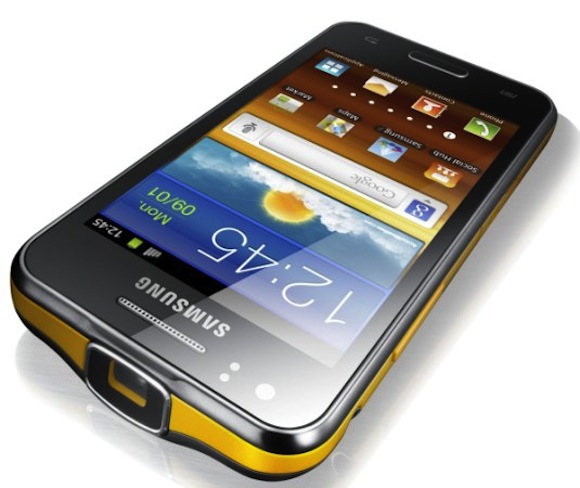
Samsung Electronics Co., Ltd, has introduced Samsung GALAXY Beam, the projector smartphone that allows users to display and share multimedia content anywhere on a large luminous projector screen.

GALAXY Beam lets users spontaneously share photos, videos or other digital media with family or friends by beaming content stored on the device directly onto walls, ceilings or improvised flat surfaces, so that everyone can share the fun without the need to huddle around smartphone or pad-sized screens. GALAXY Beam’s ultra-bright 15 lumens projector allows users to freely share life’s memorable moments instantly and in crisp clarity, even in outdoor environments.

“GALAXY Beam provides mobile freedom, enabling a unique shared experience around digital content for everyone-anywhere and instantly-from a smartphone as slim and portable as any on the market,” said JK Shin, President of IT & Mobile Communications Division at Samsung Electronics.

GALAXY Beam is a device borne out of Samsung’s insight and innovation, demonstrating Samsung’s commitment to providing extraordinary experiences for consumers with products that let them express and fulfill themselves.”

Video clips, maps, business information, games – a whole range of multimedia content can be beamed instantly by GALAXY Beam on a crisp, high-definition projection up to 50” wide. The device features a projector-dedicated application which makes it easy to select content and activate projection in a few simple steps.

Add a dose of ambience or entertainment to a friends’ gathering by transforming any household room or outdoor deck into an instant mini home-theater, projecting full-screen video clips on a ceiling or wall for common sharing, at the touch of a button. Or capture your favorite holiday moments using the GALAXY Beam’s 5MP camera, then display a full photo slideshow to family members on a dining room wall while playing accompanying music straight from the device, so that everyone shares the experience.

For young users who depend on constant, immediate socializing of digital content and entertainment, GALAXY Beam introduces a new way of sharing. It becomes much more than a phone-a handy digital tool, deployable anywhere, which can add visual entertainment to a simple street gathering, set the mood for a small party, or simply turn life’s moments into something personally and immediately sharable. With GALAXY Beam, a birthday or anniversary party can be enlivened in seconds by sharing YouTube or Hulu music videos straight onto a ceiling or door. Likewise, students can collectively share videos or study-work in any dormitory room or student lounge, turning group study into a whole new interactive experience right from a desk table or from the palm of their hands. GALAXY Beam is also ideal for action-packed interactive gaming: Users can upload their own games or choose from over 1,000 games available via Game Hub, Samsung’s dedicated virtual gaming store, then project games to co-players or observers to turn gaming into an unbeatably interactive, shared experience. Additionally, GALAXY Beam is convenient tool for mid-sized business workers. An estate agent can beam images of candidate properties to customers as they tour them; or an architect can display draft concepts or designs to co-workers on the spot at a building site or public location.

Despite featuring a full built-in projector, the GALAXY Beam does not compromise on style or portability, measuring just 12.5mm thick and featuring an elegant, ergonomic design. It runs on Android 2.3 Gingerbread which is powered by an impressive 1.0GHz dual-core processor, ensuring great versatility and a highly responsive user interface. An impressive 8GB of internal memory allows ample multimedia storage without compromises, and a powerful 2000 mAh battery ensures greater display power and content freedom.

The GALAXY Beam is exhibited at Samsung stand (Hall 8), Mobile World Congress 2012. For multimedia content and more detailed information, please visitwww.samsungmobilepress.com.

ZTE to launch eight new phones at Mobile World Congress

ZTE Corporation, will next week announce a significant extension of its Smart Terminal capabilities – both in its product range and routes to market – including a major new quad-core flagship handset.

ZTE will unveil eight new devices, delivering significant advances in power, high definition multimedia capabilities and design. Based on technology innovations including multi-core chipsets, LTE, 4G radio and the latest Android and Windows Mobile platforms, the new devices form a core component of ZTE’s ambition to become a top three handset provider by 2015.

On the infrastructure side, ZTE will be demonstrating a wide range of application scenarios covering LTE/LTE-A, smart networks and cloud computing.

“There is no doubt that this year’s Mobile World Congress will again see some exciting device launches. The new devices from ZTE will demonstrate how ZTE is without doubt among an elite group of handset providers as next generation telecommunications networks roll out globally. ZTE returns at least ten percent of its revenues back into R&D to ensure that it sustains its position as a true market innovator – and we’re counting down to being able to showcase this to the world’s mobile industry next week,” said Mr. He Shiyou, Executive Vice President and Head of the Terminals Division at ZTE.

The devices will be officially unveiled in a press conference at Mobile World Congress in Barcelona on Monday 27th February at 10:30 CET. The new devices, together with a comprehensive portfolio of ZTE terminals, will be on display at the ZTE booth in Hall 8, stand B145.

Apache Software Foundation Celebrates the 17th Anniversary of the Apache HTTP Server with the release of v2.4

The Apache Software Foundation (ASF), the all-volunteer developers, stewards, and incubators of nearly 150 Open Source projects and initiatives, today announced version 2.4 of the award-winning Apache HTTP Server. Celebrating its 17th anniversary with an all-time record of nearly 400 million Websites powered worldwide[1], the Apache HTTP Server has been the most popular Web server on the Internet since April 1996.

“It is with great pleasure that we announce the availability of Apache HTTP Server 2.4”, said Eric Covener, Vice President of the Apache HTTP Server Project. “This release delivers a host of evolutionary enhancements throughout the server that our users, administrators, and developers will welcome. We’ve added many new modules in this release, as well as broadened the capability and flexibility of existing features”.

Numerous enhancements make Apache HTTP Server v2.4 ideally suited for Cloud environments. They include:
• Improved performance (lower resource utilization and better concurrency)
• Reduced memory usage
• Asyncronous I/O support
• Dynamic reverse proxy configuration
• Performance on par, or better, than pure event-driven Web servers
• More granular timeout and rate/resource limiting capability
• More finely-tuned caching support, tailored for high traffic servers and proxies.

Additional features include easier problem analysis, improved configuration flexibility, more powerful authentication and authorization, and documentation overhaul. For the complete feature list, please see http://httpd.apache.org/docs/2.4/new_features_2_4.html

The Apache Web Server began as a fork (an independent development stream) of the NCSA httpd Web server created by Rob McCool at the National Center for Supercomputing Applications (NCSA). After McCool’s departure from NCSA in 1994, an online community of individuals called the Apache Group formed to support and enhance its software via email collaboration. The Apache Group’s founding members included Brian Behlendorf, Roy Fielding, Rob Hartill, David Robinson, Cliff Skolnick, Randy Terbush, Robert Thau, and Andrew Wilson.

Within less than a year of the Apache Group’s formation, the Apache server surpassed NCSA httpd as the #1 server on the Internet –and remains so to this day. In March 1999, members of the Apache Group formed The Apache Software Foundation to provide organizational, legal, and financial support for the Apache HTTP Server.

Availability and Oversight
Apache HTTP Server software is released under the Apache License v2.0, and is overseen by a self-selected team of active contributors to the project. A Project Management Committee (PMC) guides the Project’s day-to-day operations, including community development and product releases. Apache HTTP Server source code, documentation, mailing lists, and related resources are available at http://httpd.apache.org/

About The Apache Software Foundation (ASF)
Established in 1999, the all-volunteer Foundation oversees nearly one hundred fifty leading Open Source projects, including Apache HTTP Server — the world’s most popular Web server software. Through the ASF’s meritocratic process known as “The Apache Way,” more than 350 individual Members and 3,000 Committers successfully collaborate to develop freely available enterprise-grade software, benefiting millions of users worldwide: thousands of software solutions are distributed under the Apache License; and the community actively participates in ASF mailing lists, mentoring initiatives, and ApacheCon, the Foundation’s official user conference, trainings, and expo. The ASF is a US 501(3)(c) not-for-profit charity, funded by individual donations and corporate sponsors including AMD, Basis Technology, Cloudera, Facebook, Google, IBM, HP, Hortonworks, Matt Mullenweg, Microsoft, PSW Group, SpringSource/VMware, and Yahoo!. For more information, visit http://www.apache.org/

Ubuntu for Android Announced

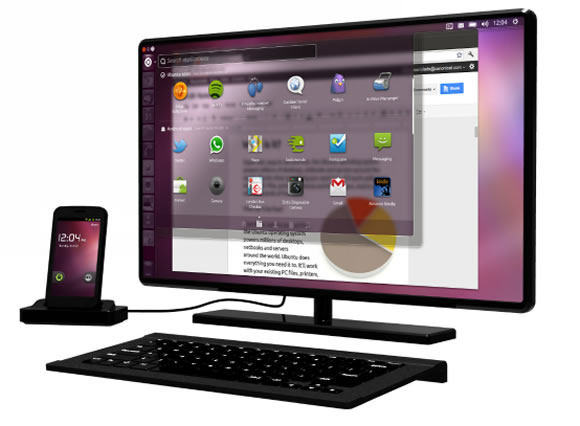
Canonical today unveiled Ubuntu for Android, bringing the world’s favourite free desktop experience to multi-core Android smartphones docked with a keyboard and monitor. Use Android on the phone and Ubuntu as your desktop, both running simultaneously on the same device, with seamless sharing of contacts, messages and other common services.

The phone experience is pure Android – it’s a normal Android phone. When the device is connected to a computer screen, however, it launches a full Ubuntu desktop on the computer display. It’s exactly the same desktop used by millions of enterprise and home users on their Ubuntu PCs, and includes hundreds of certified applications, from office productivity to photography, video and music.

All data and services are shared between the Ubuntu and Android environments, which run simultaneously on the device. So Android applications such as contacts, telephony and SMS/MMS messaging are accessible from the Ubuntu interface. Indeed, all data on the smartphone can be accessed at any time, docked or not.

Ubuntu for Android gives mobile workers a company phone that is also their enterprise desktop. Government and private institutions have embraced Ubuntu on the desktop because of its ease of use, security, manageability, superb range of native applications and excellent support for web browsers like Chrome and Firefox. The desktop can also include Windows applications, using thin client and desktop virtualisation tools. Today’s IT departments commonly support a PC and at least one desktop phone for every employee. Many also provide and manage mobile phones. Ubuntu for Android presents a compelling solution to IT complexity by reducing that burden to a single device.

The first PC for the next billion knowledge workers could be a phone – but they won’t just want to use it as a handset. They will want all the flexibility and productivity of a full desktop, as well as the convenience of a smartphone on the move. Ubuntu for Android represents the first opportunity for handset makers and network operators to address this growth opportunity in emerging markets.

“The desktop is the killer-app for quad-core phones in 2012” says Mark Shuttleworth. “Ubuntu for Android transforms your high-end phone into your productive desktop, whenever you need it”

Manufacturers targeting the corporate phone, as well as the next-generation enterprise desktop and thin clients can easily add Ubuntu for Android to their smartphones. The customized version of Ubuntu drops in cleanly alongside the rest of Android, and the necessary Android modifications are designed for easy integration. Hardware requirements include support for HDMI and USB, standard features in high-end handsets planned for late 2012.

Ubuntu for Android justifies the cost to enterprise customers of upgrading to higher bandwidth 4G connections and contracts. Cloud apps like Google Docs work best with a full desktop, and shine with the lower latency of LTE. Network operators can deliver their own branded applications and services as part of the Ubuntu desktop, in partnership with Canonical.

Canonical leads the traditional Linux ecosystem in support for the ARM architecture, having co-founded Linaro (linaro.org), the consortium dedicated to the unification of Linux on ARM and the simplification of Android integration and delivery. That industrial experience, combined with Canonical’s long-standing leadership in desktop Linux and deep relationships with global PC brands enables Canonical to deliver an ARM-optimised desktop tightly integrated with Android, on silicon from a range of ARM vendors.

Product information and specifications at www.ubuntu.com/devices/android
Contact us to bring Ubuntu for Android to market: www.ubuntu.com/devices/android/contact-us

BlackBerry PlayBook OS 2.0 announced

Research In Motion (RIM) announced that the new BlackBerry® PlayBook™ OS 2.0 will be released for download today. BlackBerry PlayBook OS 2.0 delivers an enhanced tablet experience and allows you to use the BlackBerry PlayBook in new ways throughout the day – at work and at play. “Building on the BlackBerry PlayBook tablet’s proven web browsing, multimedia and multitasking strengths, the new BlackBerry PlayBook OS 2.0 introduces a range of new communications and productivity enhancements as well as expanded app and content support,” said David J. Smith, SVP Mobile Computing, Research In Motion.

New BlackBerry PlayBook OS 2.0 features include:

• Integrated email client with a powerful unified inbox: With BlackBerry PlayBook OS 2.0 you have the option to use a unified inbox that consolidates all messages in one place, including messages from Facebook®, LinkedIn® and Twitter®, as well as personal and work email accounts.

• Social Integration with Calendar and Contacts apps: The built-in calendar harnesses information from social networks and makes it available where and when users need it. Contact cards are also dynamically populated with updated information from Facebook, Twitter, and LinkedIn to create a consolidated view of contacts.

• Updated BlackBerry Bridge app: BlackBerry® Bridge™ is a unique app that provides a Bluetooth® connection between your BlackBerry PlayBook and core apps on your BlackBerry® smartphone (including BBM™, Email, Contacts, Calendar and Browser) in order to let you view the content on the larger tablet display. With BlackBerry PlayBook OS 2.0, it’s easier and quicker than ever to take documents, web pages, emails and photos that appear on your BlackBerry smartphone and display them on your BlackBerry PlayBook for an optimized viewing and editing experience. The updated BlackBerry Bridge app also provides a new remote control feature that allows a BlackBerry smartphone to be used as a wireless keyboard and mouse for a BlackBerry PlayBook.

• Improved mobile productivity: Updated document editing functions, the new Print To Go app, and increased control and manageability of corporate data with BlackBerry® Balance ™ allow you to get more out of your BlackBerry PlayBook every day. Plus, an updated virtual keyboard with auto correction and predictive next word completion learns how you type to enable faster, more accurate typing.

• New apps and content: Thousands of new apps are being added to BlackBerry App World™ today (including a range of Android® apps that will run on the BlackBerry PlayBook). A new BlackBerry Video Store1 is launching today. Enhanced web browsing capabilities are also available with BlackBerry PlayBook OS 2.0.

In conjunction with the release of BlackBerry PlayBook OS 2.0, RIM is making available an initial release of BlackBerry® Mobile Fusion that will include support for managing BlackBerry PlayBook tablets and BlackBerry smartphones2 in an enterprise. The full release of BlackBerry Mobile Fusion (with mobile device management capabilities for iOS and Android devices) is planned for general availability in late March 2012. For more information about BlackBerry Mobile Fusion, please visit www.blackberry.com/mobilefusion. Availability The BlackBerry PlayBook OS 2.0 software update is now available as a free download for all BlackBerry PlayBook tablets.

Review: http://www.engadget.com/2012/02/23/blackberry-playbook-os-2-0-review/

Samsung introduces Galaxy Ace 2 and Galaxy mini 2

Samsung Electronics Co., announced two new additions to the GALAXY smartphone range: GALAXY Ace 2, which will be available in UK from April, and GALAXY mini 2, which will be available in France from March before being rolled out globally.

Building on the market success of GALAXY Ace and GALAXY mini since their release last year, GALAXY Ace 2 and GALAXY mini 2 are ideal devices for users with active lifestyles who value individuality and style without compromising on performance or affordability.

“Launched in 2011, GALAXY Ace and GALAXY mini have been a huge success in the global market. Today, we introduce GALAXY Ace 2 and GALAXY mini 2 with upgraded features and services,” said JK Shin, President of IT & Mobile Communications Division at Samsung Electronics. “Our goal remains the same-to continue to create new and improved mobile experiences that deliver something suitable for everyone. This is the hallmark of Samsung’s GALAXY range and what has made the GALAXY brand such a runaway hit with consumers around the world.”

Double-Engine Power, GALAXY Ace 2

GALAXY Ace 2 delivers efficient multitasking, lightning-fast screen transitions and high-quality graphics for even the most demanding applications and games. HSPA 14.4 connectivity provides an enhanced browsing experience and fast content downloads with minimal lag-times. Additionally, 4GB of internal storage ensures that films, photos and a whole array of personal multimedia content can be easily stored and taken out and about; a 1,500mAh battery adds to GALAXY Ace 2’s on-the-go performance for active, demanding use.

Enhanced Samsung Hubs and ChatON services ensure that users are never far from the content or social connections they care about. Music Hub allows one-step access to over 17million tracks at anytime; Game Hub offers users the very latest gaming titles; Social Hub allows users to view their instant messages, social network and email communications all in one single inbox. Samsung’s ChatON service connects users with other phone users – across any platform – into a single community, providing easy multi-format instant messaging and group chatting.

Compact and Trendy for more fun, GALAXY mini 2

GALAXY mini 2 packs a real performance punch into its slim and colorful 11.9mm-thick casing. The 3.27″ HVGA touch-screen enables high-quality multimedia viewing while maintaining the device’s portability. The compact GALAXY mini 2 ensures comfortable Web browsing and easily handles the demands of the most resource-intensive applications.

An improved 1,300mAh battery capacity also guarantees extended multimedia usage and longer chat sessions. 4GB of storage allows users to comfortably store videos, music and images.

Like GALAXY Ace 2, GALAXY mini 2 keeps users connected through ChatON and Social Hub, while Music Hub allows one-step access to over 17million tracks at any time.

For multimedia content and more detailed information, please visit www.samsungmobilepress.com.

ZTE announces LTE Android smartphones

ZTE Corporation, is planning to launch two new LTE handsets running Android 4.0 (Ice Cream Sandwich) with 1.2GHz and 1.5GHz chipsets at the forthcoming Mobile World Congress telecoms industry show in Barcelona.


ZTE PF200

The PF200 smart phone will have a 4.3 inch QHD capacitive touch screen, with an 8MP camera and 1080p front facing camera for video calling. The handset will work across all the main LTE, UMTS and GSM spectrums, and will come with Bluetooth 2.1, GPS, WiFi, A-GPS, digital living network alliance (DLNA) compatibility, mobile high-definition link (MHL) for connecting to home audio and video devices, and near field communications (NFC) capability.

The N910 handset will work across LTE FDD, CDMA and EVDO spectrums. It has a WVGA (800 x 480) capacitive touch screen, with 5MP autofocus and flash camera with a 1080p front facing camera for video calling. Features will include GPOS, WiFi, Bluetooth and DLNA capability.

“These LTE devices are the fore-runners of a wide range of LTE devices ZTE will bring to the market in the coming months, and as more and more LTE networks come on stream,” said Mr. He Shiyou, Executive Vice President and Head of the Terminal Division of ZTE. “They will be feature products – among a very wide range of devices on display at the ZTE stand at Mobile World Congress 2012.”

ZTE will be on stand B145 in Hall 8 at Mobile World Congress 2012 which takes place at the Fira exhibition site in Barcelona, Spain from March 27-30.

The Document Foundation Announces LibreOffice 3.5

The Document Foundation announces LibreOffice 3.5, the third major release of “the best free office suite ever”, which shows to end users the improvements derived from the development strategy adopted since September 2010. LibreOffice 3.5 derives from the combined effort of full time hackers – the largest group of experienced OOo code developers – and volunteer hackers, coordinated by the Engineering Steering Committee.

During 16 months, an average of 80 developers each month have provided a total of over thirty thousand code commits, introducing new and interesting features:

Writer

– a new built-in Grammar checker for English and several other languages
– improved typographical features, for professional looking documents
– an interactive word count window, which updates in real time
– a new header, footer and page break user interface

Impress / Draw

– an improved importer of custom shapes and Smart Art from PPT/PPTX
– a feature for embedding multimedia/colour palettes into ODF documents
– a new display switch for the presenter’s console
– new line ends for improved diagrams
– Microsoft Visio import filter

Calc

– support for up to 10,000 sheets
– a new multi-line input area
– new Calc functions conforming to the ODF OpenFormula specifications
– better performances when importing files from other office suites
– multiple selections in autofilter
– unlimited number of rules for conditional formatting

Base

– a new integrated PostgreSQL native driver

In addition, for the first time in the history of LibreOffice, we will be enabling the online update checker, which informs users when a new version of the suite is available.
“We inherited a 15 years old code base, where features were not implemented and bugs were not solved in order to avoid creating problems, and this – with time – was the origin of a large technical debt,” says Caolán McNamara, a senior RedHat developer who is one of the founders and directors of TDF. “We had two options: a conservative strategy, which would immediately please all users, leaving the code basically unchanged, and our more aggressive feature development and code renovation path, which has created some stability problems in the short term but is rapidly leading to a completely new and substantially improved free office suite: LibreOffice 3.5, the best free office suite ever.”

“In sixteen months, we have achieved incredible results – comments Michael Meeks, a SUSE Distinguished Engineer, who is also a founder and director at TDF – with nearly three hundred entirely new developers to the project, attracted by the copyleft license, the lack of copyright assignment and a welcoming environment. In addition to the visible features, they’ve translated tens of thousands of German comments, removed thousands of unused or obsolete methods – sometimes whole libraries – and grown a suite of automated tests. Although we still have a long way to go, users – who have sometimes complained for the stability of the software, as they were not aware of the technical debt we were fighting with – can now benefit from a substantially cleaner, leaner and more feature rich LibreOffice 3.5.”

LibreOffice 3.5 is the first release where the contribution of local communities and associations, such as ALTA in Brazil, has been acknowledged. In addition, TDF tried to recognize those volunteers – where we could easily identify them – who put so much into the 3.5 release, with a “hacking” or “bug hunting” hero badge presented the same day of the announcement. TDF is encouraging the development of a global, open and diverse ecosystem where companies, associations, local communities and volunteers share the common objective of developing the best free office suite ever.

The Document Foundation invites power users to install LibreOffice 3.5, and more conservative users to stick with LibreOffice 3.4 branch. Corporate users are strongly advised to deploy LibreOffice with the backing of professional support, from a company able to assist with migration, end user training, support and maintenance. The Document Foundation will soon provide a list of certified organizations providing these professional services.

LibreOffice 3.5 is available from: http://www.libreoffice.org/download. The new features and the improvements are described in the infographic which can be downloaded from: http://dl.dropbox.com/u/116590/lo35-infofinal.pdf.

Scalado Remove new photo object removal technology

Scalado, a world-leading provider of high-performance imaging technologies, applications and services for the mobile industry, have today announced the release of a new revolutionizing product named Remove. Remove is a technology that automatically highlights and removes any unwanted object from a captured photo. It is the world’s first Object removal software to be released on a mobile device.

Remove solves common photographic problems with unwanted objects in captured images, such as people getting in the way of our camera shot. Remove detects and selects the unwanted objects which simply can be removed automatically or by touching the selections on the screen or after capturing the image.

“After Zero Shutter Lag, Burst, and Rewind Scalado continue leading and changing the capturing landscape by bringing in new unique and needed capturing innovations”, says Fadi Abbas, CMO/VP BizDev and Co-founder of Scalado, -“What differentiate us is the combination of customers who believe in our superiority, leading industry partners and continuous innovations”.

Last year Scalado released several innovations, e.g. the Rewind technology which allows the users to capture perfect group shots by automatically selecting the best shots in a burst and merging them into one perfect image. Rewind is already shipping in millions of mobile phones.

“Our team has been working hard to maintain its leading innovation position in the camera capturing field”, says Sami Niemi, CTO and Co-founder of Scalado, -“Remove shows that our technologies are setting the guidelines for the whole market”.

Scalado will premiere showcase Remove, the first of many new innovations planned this year, at the 2012 Mobile World Conference in Barcelona, February 27th to March 1st.