Monthly Archives: January 2012

28 posts

Box for Android updated to 1.5

In version 1.5 of Box for Android, we’ve added 3 main features that will help those actively sharing and editing files on Box with others. You can now keep an eye on updates to your files right from a home screen widget, send files to Box from anywhere you can open files (like email attachments), and create new Office® documents with compatible apps like QuickOffice Pro.

When you’re working with a lot of people on a number of files simultaneously, it’s hard to keep track of what version of which file is updated, and when. When accessing Box in your browser or on your iPhone or iPad, you see these details in an Updates feed. Now Box for Android goes one step further and puts updates right on your home screen with the Box widget!

To add the widget, just long-press on an empty space on a home screen, choose to add a Widget, then choose “Box”. Position the widget wherever you’d like by long-pressing on it and dragging it around.

In addition to showing updates, the widget also provides useful shortcuts to create or upload new files without needing to open the Box app.

Upload files from any app

Wherever you have the option to view a file, you now also have the option to upload it to Box – which is really useful when you get email attachments or download files via the browser. Put them on Box and start sending links instead of attaching files in emails!

Create Office documents

If you have an app capable of editing these file types, you will see new options to add documents, spreadsheets, presentations and plain text files on the Create menu. Choosing these file types will open the editor of your choice and save the file you create back to Box when you’re done.

You’ll need an app capable of editing these files (not just viewing them) in order to see this feature – we recommend QuickOffice Pro, DocumentsToGo or Kingsoft Office.

Skype and Tely Labs Partner to Bring Android HD Video Calling to the Living Room TV

Advanced, All-in-One, Android-Based System Lets Consumers Connect Instantly to Those Who Matter Most — Right From Their TV, in Amazing HD Video Quality
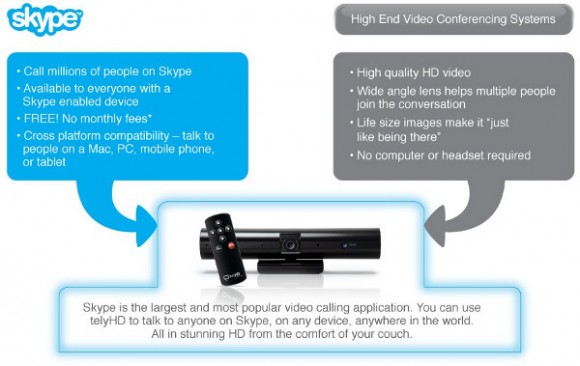
Skype and Tely Labs today announce a partnership in which Tely Labs will offer Skype’s globally popular communications software in their powerful, yet compact, video calling device — telyHD, allowing everyday consumers to experience free Skype video calling with big-screen impact and high-definition clarity. Now, the entire household can use their TV to instantly and easily connect face-to-face with family and friends worldwide through Skype — whether on a computer, tablet, smartphone or TV. telyHD — which doesn’t require a computer and is compatible with most HD TVs — is well-priced, sets up in minutes, uses industry-leading Skype and Android technologies, and allows for video calls to take place in a comfortable, naturally social setting — your living room.

“telyHD fundamentally redefines the video calling experience and, in a larger sense, how we connect and communicate with people across the globe. We acknowledge the potential of video calling and the power of Skype as we evolve it beyond the computer screen and onto an HD TV that closely resembles immersive, real-world interaction. What’s truly exciting is that we make this next-gen video interaction possible with telyHD, an extremely simple-to-use device designed and priced for everyday consumers,” said Sreekanth Ravi, CEO of Tely Labs.

“We are proud of our work with Tely Labs, because it demonstrates how pioneering companies can integrate the Skype platform into our users’ daily lives in compelling new ways providing our community with the widest possible range of video calling options. We are excited that, with telyHD, our users will have an entirely new way to enjoy HD big-screen interaction with their friends and family,” said Manrique Brenes, Skype’s senior director of platform business.

Skype in HD Moves into the Living Room
telyHD gives consumers the freedom to share moments big and small with friends and family around the world. Unlike traditional computer-based web cameras, telyHD is designed for the living room with a wide-angle camera that zooms, pans and tilts to capture an entire room and all the participants in stunning HD video.1 By opening up the living room to Skype, consumers can interact in a more natural, social way. Anyone on Skype can receive a telyHD video call, whether using Skype on a computer, tablet or smartphone, and can enjoy the improved telyHD video regardless of whether or not they have their own telyHD system.

When both parties have telyHD systems, they can take advantage of even more capabilities including video mail — a messaging system feature that allows users to record a video message such as a birthday greeting for friends or family that are not available to chat. Additionally, participants can share photos together while interacting on a telyHD video call. Users can even download a favorite photo right to a USB memory stick or SD card that plugs into the telyHD system as they video chat.*

Simple, Affordable, and Complete System
An all-in-one system, telyHD includes everything necessary to initiate a video call in minutes. The single-box solution features a wide-angle HD camera, four microphones with noise cancellation, built-in Wi-Fi or wired Internet connectivity, an easy to use remote control, and all necessary cables. telyHD does not require a computer or any additional hardware; users simply link it to their home network and plug it into their HD TV via HDMI. The telyHD unit sits discreetly on top of the TV or can be placed on a nearby shelf or tripod. It has a fully adjustable clamp so that it will fit perfectly on any size TV.

Extensible Android-Based Entertainment Platform for the Future
When a consumer purchases telyHD today, they benefit from the immediate Skype video calling capabilities and also buy into a system that is designed for the future. The telyHD system is built on the powerful, extensible Android OS and uses the high-performance Tegra 2 Dual-Core ARM A9 processor from NVIDIA. With this solid foundation, telyHD users will be able to use the system for an array of compelling home entertainment activities in the future — from social networking and gaming to video streaming and more. Tely Labs is already working with the Android developer community to identify new apps that extend the ways consumers can use and enjoy telyHD in the home.

Pricing and Availability
telyHD will be available beginning January 5, 2012 through online retailers Amazon, Tely.com and Skype.com. The telyHD system is priced at $249 with no monthly fees and no PC required**.

About Tely Labs:
Founded in 2010 by the successful entrepreneurial team Sreekanth Ravi (president and CEO) and Sudhakar Ravi (CTO), Tely Labs is a pioneer in developing simple, affordable next-generation entertainment and communications systems that fundamentally change the way consumers communicate across the globe. The company’s flagship product, telyHD, will be publicly unveiled at CES 2012 in Las Vegas. Built on the fast-growing Android OS and Skype software, telyHD delivers full HD Skype video calling to the living room on an HD TV allowing everyday consumers to experience free Skype video calling with big-screen impact and high-definition clarity. Tely Labs is based in Menlo Park, California.
Visit us on the web at www.tely.com/.

About Skype
Skype is a communications software whose purpose is to break down barriers to communication. With an Internet-connected device, families, friends and colleagues can get together for free with messaging, voice and video. At low cost, they can also call landlines or mobiles virtually anywhere in the world. Skype has recently introduced group video, allowing groups of more than two people to do things together whenever they’re apart.

Founded in 2003 and based in Luxembourg. Skype can be downloaded onto computers, mobile phones and other connected devices for free at www.skype.com.

1 HD quality is achieved with HDMI enabled TVs
*telyHD to telyHD only
**broadband/Wi-Fi connection is required

Red Scarlet-X 4K camera video review

Cinema5D have posted some video review for Red’s Scarlet-X 4K camera at www.cinema5d.com/news/?p=9409

With the innate ability to capture 5K REDCODE RAW stills and 4K motion, resolution sustains itself as a dominant gene in the RED family. Scarlet-X functions as a flexible device, utilizing HDRx and interchangeable lens mounts to provide you with options in a world that’s always changing. 5K burst modes snap up to 12 fps with 4K reaching up to 30 fps—helping you capture every perfect moment. All of the finest qualities of cinema and photography have now aligned, letting you take advantage of the best of both worlds with Scarlet-X.

Samsung DV300F Wi-Fi Digital Camera

Samsung Electronics Co., Ltd, unveiled a new addition to its market-leading Samsung DualView® line, the DV300F. With this launch, Samsung continues to cement its leadership position by introducing the latest in Dual LCD technology with Wi-Fi connectivity for camera users who want to snap and share moments in an instant.

The Samsung DV300F builds on the success of Samsung’s DualView technology with a 1.5″ front facing LCD screen that helps ensure users are capturing the most challenging shots. Child Mode displays an animation to keep little ones focused, and the visual Self Timer makes it easy to put oneself in the picture.

In response to evolving consumer demands for maximum creativity and shareability, the DV300F is the first DualView model to offer Wi-Fi connectivity. The camera’s built-in Wi-Fi connectivity enables users to email their images or upload them to social media sites including Facebook, Picasa, Flickr and YouTube. In addition, images saved onto the camera’s microSD memory card, can be saved to a home PC without wires, by using the Auto PC Backup function. Cloud services, including Samsung’s AllShare Play and Microsoft SkyDrive, allows users to store and share their precious pictures from anywhere.

For consumers on the lookout for sophisticated design and premium quality, the latest model comes in several shimmering metallic colors, including mock black, silver, navy and red. The new DualView camera features a sleek, seamless, and rounded form factor for ultimate style without compromising ease of use and image quality. The DV300F boasts an impressive 16 Megapixels, 5x optical zoom and 25mm wide-angle lens to capture all the action, even from a distance.

“Our aim is to continually be at the forefront of innovation and maintain our leadership within the DualView market, pioneered by Samsung,” stated Mr. Myoung Sup Han, senior vice president and head of digital imaging business, Samsung Electronics. “The new DV300F model is the embodiment of this goal. This latest model with the DualView LCD, Wi-Fi connectivity, ultra premium styling and the latest creative features, demonstrates Samsung’s unwavering commitment to innovation within the digital compact camera market, as well as our ability to consistently meet the needs of our customers.”

Get Creative with Magic Frame and Picture-in-Picture Shot
The DV300F is crammed full of fun features to maximize users’ enjoyment. The Magic Frame feature includes 12 fun background templates, as well as the ability to create poster-quality art, perfect for sharing or hanging. The camera’s Picture-in-Picture function lets users insert one image within another. Users can even impress their friends by combining a still picture with a video clip and instantly uploading it to YouTube or other social networking sites.

Maximize enjoyment with latest Photo shot features
With the Split Shot feature, users can merge up to three different images to create their very own artistic masterpiece! Pictures can even be imported from other cameras. However, the fun doesn’t stop there. Funny Face allows photographers to add goofy grins, comical noses or even crazy eyes to shots of friends and family in eight different modes.

The innovative new Artistic Brush feature can instantly take a portrait, landscape shot or even a movie clip and transform it into a black and white or full color sketch just like an artist would! Users can then show off their artistic creation via the camera’s LCD, or by simply uploading their creation to social networking sites to ensure everyone look at their creative masterpiece or potentially, their latest profile picture — with a twist.

Finally, the model includes the new Motion Photo feature. Similar to the latest Hollywood blockbuster, users can freeze time around a moving subject for dramatic effect. Now, users can capture a friend jumping in the park and keep everyone else around them still.